Attributes - CoordSys, Units
Currently there are two attribute objects, 1) CoordSys for defining coordinate systems, 2) Units for defining the units of physical quantities and
Note that the Units and CoordSys objects hold floating point data internally in double precision.
Coordinate System - CoordSys
The CoordSys object is used to define Cartesian, cylindrical, spherical and toroidal coordinate systems. The systems are defined given an origin and orientation relative to the global coordinate system. The methods associated with a CoordSys object are the following.
- Begin and end an instance of an object, generic object functions
vis_CoordSysBegin()- create an instance of a CoordSys objectvis_CoordSysEnd()- destroy an instance of a CoordSys objectvis_CoordSysError()- return CoordSys object error flagvis_CoordSysCopy()- make a copy of a CoordSys object
- Operations
vis_CoordSysDef()- define coordinate system typevis_CoordSysInq()- inquire coordinate system typevis_CoordSysComputeCoord()- compute coordinates in global systemvis_CoordSysComputeVector()- compute vector in global systemvis_CoordSysComputeTensor()- compute tensor in global systemvis_CoordSysComputeMatrix()- compute general tensor in global systemvis_CoordSysConvertCoord()- convert coordinates to local systemvis_CoordSysConvertVector()- convert vector to local systemvis_CoordSysConvertTensor()- convert tensor to local systemvis_CoordSysConvertMatrix()- convert general tensor to local systemvis_CoordSysDirCos()- compute direction cosine matrixvis_CoordSysRotAng()- compute rotation angle vectorvis_CoordSysOriginTriad()- query origin and orientationvis_CoordSysOriginRotAng()- query origin and orientationvis_CoordSysSetOriginRotAng()- specify origin and angle orientationvis_CoordSysSetOriginTriad()- specify origin and triad orientationvis_CoordSysSetOriginVectors()- specify origin and vector orientationvis_CoordSysSetOriginZAxis()- specify origin and z axis orientationvis_CoordSysSetRadius()- specify radius of torusvis_CoordSysTransform()- translate and rotate a coordinate system
Instance a CoordSys object using vis_CoordSysBegin().
Once a CoordSys
object is instanced, define the coordinate system type using
vis_CoordSysDef().
Coordinate system types include Cartesian, cylindrical, toroidal and two
variations of spherical systems. After the coordinate system type is
defined then set the coordinate system origin and orientation direction
cosine matrix using vis_CoordSysSetOriginTriad().
If the user is only concerned with the orientation of the z axis then
use vis_CoordSysSetOriginZAxis().
In this case the directions of the x and y axes will be automatically
generated.
The following convention for the direction cosine matrices of a local coordinate system is used. Given that x’,y’ and z’ are three orthonormal vectors indicating the direction of the local coordinate axes in the global coordinate system (x,y,z), then the direction cosine matrix, tm for this local coordinate system is defined as:
tm[0][0] = x'x  tm[0][1] = x'y  tm[0][2] = x'z
tm[1][0] = y'x  tm[1][1] = y'y  tm[1][2] = y'z
tm[2][0] = z'x  tm[2][1] = z'y  tm[2][2] = z'z
where y’x, for example, is the global x coordinate of the y’ unit vector.
Note that all CoordSys functions involving floating point data have both single and double precision versions. The single precision versions are provided for convenience, all floating point data is held internally in the CoordSys object in double precision.
The orientation of the coordinate system is specified by a direction cosine matrix which defines a local x’,y’,z’ rectangular system in global coordinate space. The coordinate system is aligned to the x’,y’,z’ system. Note that all angles are in degrees.
- A Cartesian system is a rectangular coordinate system characterized by coordinates x’,y’,z’.
- A cylindrical system is characterized by coordinates r,theta,z’ where theta is the angle about the z’ axis (positive x’ toward positive y’). An alternate definition of a cylindrical system is available characterized by coordinates z,theta,r where theta is the angle about the z’ axis (positive y’ toward positive x’).
- A spherical system is characterized by coordinates r,theta,phi where theta is the angle about the z’ axis (positive x’ toward positive y’) and phi is the angle about the x’ axis (positive y’ toward positive z’). An alternate definition of a spherical system is available (for specific support of NASTRAN spherical coordinate systems) in which theta is the angle about the negative x’ axis (positive z’ toward positive y’) and phi is the angle about the z’ axis (positive x’ toward positive y’).
- A toroidal system is characterized by a radius of the torus and coordinates r,theta,phi where theta is the angle about the z’ axis (positive x’ toward positive y’) and phi is the angle about the x’ axis (positive y’ toward positive z’).
Figure 2-1 illustrates the coordinate system conventions. Use the Triad object to draw coordinate systems.
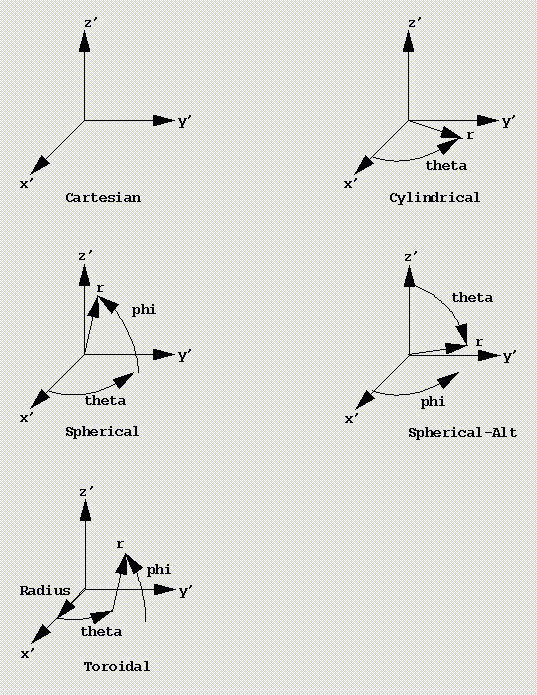
Figure 2-1, Coordinate System Conventions
The functions vis_CoordSysConvertVector(), vis_CoordSysConvertTensor()
and vis_CoordSysConvertMatrix()
may be used to convert a vector, tensor or general tensor at a point
P expressed in the global Cartesian system to a local Cartesian
system which is dependent upon the coordinate location of P. The
functions vis_CoordSysComputeVector(), vis_CoordSysComputeTensor()
and vis_CoordSysComputeMatrix()
perform the inverse transformation. See section VisTools, Mathematical
Data Types
for a description of ordering conventions for the components of vectors,
tensors and general tensors. The local Cartesian system at point P
may be computed using vis_CoordSysDirCos().
The function vis_CoordSysDirCos()
may be used to compute the direction cosine matrix of a local Cartesian
coordinate system at a point. Figure 2-2 illustrates the local Cartesian
direction cosine matrix x’,y’,z’ computed at a point P within a
cylindrical coordinate system. The x’ local axis is in the radial
direction at P, the y’ local axis is in the tangential direction at
P and the z’ axis is in the axial direction. The equivalent,
rotation angle vector representation of the local Cartesion system at
point P may be computed using vis_CoordSysRotAng().
This rotation angle vector may be converted to a direction cosine matrix
using the Rodrigues formula. It is a vector whose direction is the axis
of rotation and whose magnitude is the rotation angle in degrees.
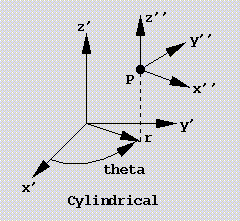
Figure 2-2, Local Cartesian Direction Cosine Matrix
The function vis_CoordSysConvertCoord()
may be used to convert a coordinate location expressed in global
Cartesian coordinates to the coordinate system type. This operation
involves subtracting the offset of the coordinate system origin and
converting to the coordinate sytem type. For cylindrical, alternate
cylindrical, spherical, alternate spherical and toroidal systems the
coordinates are converted to (r,theta,z’), (z’,theta,r), (r,theta,phi)
(r,theta,phi) and (r,theta,phi) respectively. The function
vis_CoordSysComputeCoord() performs the inverse operation.
Function Descriptions
The currently available CoordSys functions are described in detail in this section.
-
vis_CoordSys *
vis_CoordSysBegin(void) create an instance of a CoordSys object
Create an instance of a CoordSys object. Memory is allocated for the object private data and the pointer to the data is returned. By default the coordinate system type is Cartesian, the identifier is 0, the origin is 0.,0.,0. and the orientation direction cosine matrix is the identity matrix.
Destroy an instance of a CoordSys object using
void vis_CoordSysEnd (vis_CoordSys *coordsys)
Return the current value of a CoordSys object error flag using
Vint vis_CoordSysError (vis_CoordSys *coordsys)
Make a copy of a CoordSys object. The private data from the fromcoordsys object is copied to the coordsys object. Any previous private data in coordsys is lost.
void vis_CoordSysCopy (vis_CoordSys *coordsys,
                       vis_CoordSys *fromcoordsys)
Returns: The function returns a pointer to the newly created CoordSys object. If the object creation fails, NULL is returned.
-
void
vis_CoordSysEnd(vis_CoordSys *p) destroy an instance of a CoordSys objec
-
Vint
vis_CoordSysError(vis_CoordSys *p) return the current value of an object error flag
-
void
vis_CoordSysDef(vis_CoordSys *p, Vint type) define a coordinate system type
Define the coordinate system type. Set the origin and orientation of the system using
vis_CoordSysSetOriginTriad(),vis_CoordSysSetOriginRotAng().vis_CoordSysSetOriginVectors()orvis_CoordSysSetOriginZAxis(). Set the radius of a toroidal system usingvis_CoordSysSetRadius().Inquire of defined type as an output argument.
void vis_CoordSysInq (vis_CoordSys *coordsys, Vint *type)- Errors
VIS_ERROR_ENUMis generated if an improper type is specified.
Parameters: - p – Pointer to CoordSys object.
- type – Coordinate system type.
x=SYS_CARTESIAN          Cartesian system
 =SYS_CYLINDRICAL        Cylindrical system
 =SYS_CYLINDRICAL_ALT    Cylindrical alternalte system
 =SYS_SPHERICAL          Spherical system
 =SYS_SPHERICAL_ALT      Spherical alternate system
 =SYS_TOROIDAL           Toroidal system
-
void
vis_CoordSysInq(const vis_CoordSys *p, Vint *type) inquire of defined type as an output argument.
-
void
vis_CoordSysSetOriginZAxis(vis_CoordSys *p, Vfloat x[3], Vfloat zv[3]) specify origin and z axis orientation
Specify the coordinate system origin, x in global coordinates and the system z axis direction vector, zv. The direction vector, zv, should be a unit vector. The orientations of the x and y axes are computed internally. This function is useful if only the z axis orientation of the system is critical. No check is performed by the CoordSys object on the validity of the input zv.
Parameters: - p – Pointer to CoordSys object.
- x – Origin of coordinate system in global coordinates.
- zv – Vector of system local z axis.
-
void
vis_CoordSysSetOriginZAxisdv(vis_CoordSys *p, Vdouble x[3], Vdouble zv[3]) specify origin and z axis orientation
-
void
vis_CoordSysSetOriginVectors(vis_CoordSys *p, Vfloat x[3], Vfloat v1[3], Vfloat v2[3]) specify origin and vector orientation
Specify the coordinate system origin, x in global coordinates and the system as two vectors, v1 and v2. The two vectors must form a valid x’-y’ plane.
- Errors
VIS_ERROR_COMPUTEis generated if the input vectors do not form a valid plane.
Parameters: - p – Pointer to CoordSys object.
- x – Origin of coordinate system in global coordinates.
- v1 – Vector along x’ axis.
- v2 – Vector in x’-y’ plane.
-
void
vis_CoordSysSetOriginVectorsdv(vis_CoordSys *p, Vdouble x[3], Vdouble xa[3], Vdouble ya[3]) specify origin and vector orientation
-
void
vis_CoordSysSetOriginRotAng(vis_CoordSys *p, Vfloat x[3], Vfloat ra[3]) specify origin and angle orientation
Specify the coordinate system origin, x in global coordinates and the system orientation using the rotation angle vector, ra.
- Errors
VIS_ERROR_COMPUTEis generated if the input vectors do not form a valid plane.
Parameters: - p – Pointer to CoordSys object.
- x – Origin of coordinate system in global coordinates.
- ra – Rotation angle vector of system local axes.
-
void
vis_CoordSysSetOriginRotAngdv(vis_CoordSys *p, Vdouble x[3], Vdouble rotang[3]) specify origin and angle orientation
-
void
vis_CoordSysSetOriginTriad(vis_CoordSys *p, Vfloat x[3], Vfloat tm[3][3]) specify origin and orientation
Specify the coordinate system origin, x in global coordinates and the system orientation, tm. The direction cosine matrix, tm, should be a proper orthonormal rotation matrix. No check is performed by the CoordSys object on the validity of the input tm.
Parameters: - p – Pointer to CoordSys object.
- x – Origin of coordinate system in global coordinates.
- tm – Direction cosine matrix of system local axis.
-
void
vis_CoordSysSetOriginTriaddv(vis_CoordSys *p, Vdouble x[3], Vdouble tm[3][3]) specify origin and orientation
-
void
vis_CoordSysSetRadius(vis_CoordSys *p, Vfloat radius) specify radius of torus
Specify the radius of the torus for a toroidal coordinate system. By default the radius is unity.
Parameters: - p – Pointer to CoordSys object.
- radius – Radius of torus.
-
void
vis_CoordSysSetRadiusdv(vis_CoordSys *p, Vdouble radius) specify radius of torus
-
void
vis_CoordSysDirCos(vis_CoordSys *p, Vfloat x[3], Vfloat tm[3][3]) compute direction cosine matrix
Compute the direction cosine matrix, tm, associated with a specified global coordinate location x. For Cartesian systems, tm is independent of location x and is aligned exactly with the system x’,y’,z’ axes. For cylindrical systems, the x local axis is in the radial direction at x, the y local axis is in the tangential direction and the z local axis is in the axial direction. For spherical systems, the x local axis is in the radial direction at x, the y local axis is in the tangential direction and the z local axis is constructed to be orthonormal to the x local and y local axes. If x is located at the coordinate system origin, then the direction cosine matrix, tm, is always aligned to the system x’,y’,z’ axes. For toroidal systems, the x local axis is in the radial direction at x, the y local axis is in the tangential direction and the z local axis is constructed to be orthonormal to the x local and y local axes.
Parameters: - p – Pointer to CoordSys object.
- x – Origin of coordinate system in global coordinates.
- tm – [out] Direction cosine matrix of system local axis.
-
void
vis_CoordSysDirCosdv(vis_CoordSys *p, Vdouble x[3], Vdouble tm[3][3]) compute direction cosine matrix
-
void
vis_CoordSysRotAng(vis_CoordSys *p, Vfloat x[3], Vfloat ra[3]) compute rotation angle vector
Compute the rotation angle vector, ra, associated with a specified global coordinate location x. This is a compact rotation angle vector using the Rodriques formula which is equivalent to the direction cosine matrix computed using
vis_CoordSysDirCos().Parameters: - p – Pointer to CoordSys object.
- x – Origin of coordinate system in global coordinates.
- ra – [out] Rotation angle vector of system local axes.
-
void
vis_CoordSysRotAngdv(vis_CoordSys *p, Vdouble x[3], Vdouble rotang[3]) compute rotation angle vector
-
void
vis_CoordSysOriginTriad(vis_CoordSys *p, Vfloat x[3], Vfloat tm[3][3]) query origin and orientation
Query the coordinate system origin, x in global coordinates and the system orientation, tm.
Parameters: - p – Pointer to CoordSys object.
- x – [out] Origin of coordinate system in global coordinates.
- tm – [out] Direction cosine matrix of system local axis.
-
void
vis_CoordSysOriginTriaddv(vis_CoordSys *p, Vdouble x[3], Vdouble tm[3][3]) query origin and orientation
-
void
vis_CoordSysOriginRotAng(vis_CoordSys *p, Vfloat x[3], Vfloat rotang[3]) query origin and orientation
Query the coordinate system origin, x in global coordinates and the system orientation as a rotation angle vector, rotang.
Parameters: - p – Pointer to CoordSys object.
- x – [out] Origin of coordinate system in global coordinates.
- rotang – [out] Rotation angle vector of system local axis.
-
void
vis_CoordSysOriginRotAngdv(vis_CoordSys *p, Vdouble x[3], Vdouble rotang[3]) query origin and orientation
Query the coordinate system origin, x in global coordinates and the system orientation as a rotation angle vector, rotang.
Parameters: - p – Pointer to CoordSys object.
- x – [out] Origin of coordinate system in global coordinates.
- rotang – [out] Rotation angle vector of system local axis.
-
void
vis_CoordSysConvertCoord(vis_CoordSys *p, Vfloat x[3], Vfloat xl[3]) convert coordinates to local system
Convert global coordinate location, x, to local coordinates xl. Use
vis_CoordSysComputeCoord()to perform the inverse operation.Parameters: - p – Pointer to CoordSys object.
- x – Global coordinates
- xl – [out] Local coordinates
-
void
vis_CoordSysConvertCoorddv(vis_CoordSys *p, Vdouble x[3], Vdouble xl[3]) convert coordinates to local system
-
void
vis_CoordSysComputeCoord(vis_CoordSys *p, Vfloat xl[3], Vfloat x[3]) compute coordinates in global system
Compute global coordinate location, x, of a point, xl, expressed in local coordinates. Use
vis_CoordSysConvertCoord()to perform the inverse operation.Parameters: - p – Pointer to CoordSys object.
- xl – Local coordinates
- x – [out] Global coordinates
-
void
vis_CoordSysComputeCoorddv(vis_CoordSys *p, Vdouble x[3], Vdouble xg[3]) compute coordinates in global system
-
void
vis_CoordSysComputeVector(vis_CoordSys *p, Vfloat x[3], Vfloat vl[3], Vfloat v[3]) compute vector in global system
Compute a vector, v, expressed in global coordinates given the vector, vl expressed in local coordinates at global coordinate location x.
Parameters: - p – Pointer to CoordSys object.
- x – Global coordinate location
- vl – Vector in local coordinates
- v – [out] Vector in global coordinates
-
void
vis_CoordSysComputeVectordv(vis_CoordSys *p, Vdouble x[3], Vdouble t[3], Vdouble tg[3]) compute vector in global system
-
void
vis_CoordSysComputeTensor(vis_CoordSys *p, Vfloat x[3], Vfloat tl[6], Vfloat t[6]) compute tensor in global system
Compute a symmetric tensor, t, expressed in global coordinates given the tensor, tl expressed in local coordinates at global coordinate location x.
Parameters: - p – Pointer to CoordSys object.
- x – Global coordinate location
- tl – Tensor in local coordinates
- t – [out] Tensor in global coordinates
-
void
vis_CoordSysComputeTensordv(vis_CoordSys *p, Vdouble x[3], Vdouble t[6], Vdouble tg[6]) compute tensor in global system
-
void
vis_CoordSysComputeMatrix(vis_CoordSys *p, Vfloat x[3], Vfloat gl[9], Vfloat g[9]) compute general tensor in global system
Compute a general tensor, g, expressed in global coordinates given the general tensor, gl expressed in local coordinates at global coordinate location x.
Parameters: - p – Pointer to CoordSys object.
- x – Global coordinate location
- gl – General tensor in local coordinates
- g – [out] General tensor in global coordinates
-
void
vis_CoordSysComputeMatrixdv(vis_CoordSys *p, Vdouble x[3], Vdouble t[9], Vdouble tg[9]) compute general tensor in global system
-
void
vis_CoordSysConvertVector(vis_CoordSys *p, Vfloat x[3], Vfloat v[3], Vfloat vl[3]) convert vector to local system
Convert a vector, v, expressed in global coordinates at global coordinate location x to the vector, vl expressed in local coordinates. Use
vis_CoordSysComputeVector()to perform the inverse operation.Parameters: - p – Pointer to CoordSys object.
- x – Global coordinate location
- v – Vector in global coordinates
- vl – [out] Vector in local coordinates
-
void
vis_CoordSysConvertVectordv(vis_CoordSys *p, Vdouble x[3], Vdouble t[3], Vdouble tl[3]) convert vector to local system
-
void
vis_CoordSysConvertTensor(vis_CoordSys *p, Vfloat x[3], Vfloat t[6], Vfloat tl[6]) convert tensor to local system
Convert a symmetric tensor, t, expressed in global coordinates at global coordinate location x to the tensor, tl expressed in local coordinates. Use
vis_CoordSysComputeTensor()to perform the inverse operation.Parameters: - p – Pointer to CoordSys object.
- x – Global coordinate location
- t – Tensor in global coordinates
- tl – [out] Tensor in local coordinates
-
void
vis_CoordSysConvertTensordv(vis_CoordSys *p, Vdouble x[3], Vdouble t[6], Vdouble tl[6]) convert tensor to local system
-
void
vis_CoordSysConvertMatrix(vis_CoordSys *p, Vfloat x[3], Vfloat g[9], Vfloat gl[9]) convert general tensor to local system
Convert a general tensor, g, expressed in global coordinates at global coordinate location x to the general tensor, gl expressed in local coordinates. Use
vis_CoordSysComputeMatrix()to perform the inverse operation.Parameters: - p – Pointer to CoordSys object.
- x – Global coordinate location
- g – General tensor in global coordinates
- gl – [out] General tensor in local coordinates
-
void
vis_CoordSysConvertMatrixdv(vis_CoordSys *p, Vdouble x[3], Vdouble t[9], Vdouble tl[9]) convert general tensor to local system
-
void
vis_CoordSysCopy(vis_CoordSys *p, vis_CoordSys *q) make a copy
Units - Units
The Units object is used to define the units for physical quantities. The basic unit types supported are length, mass, time, temperature, angle and charge. The methods associated with a Units object are the following.
- Begin and end an instance of an object, generic object functions
vis_UnitsBegin()- create an instance of a Units objectvis_UnitsEnd()- destroy an instance of a Units objectvis_UnitsError()- return Units object error flagvis_UnitsCopy()- make a copy of a Units object
- Operations
vis_UnitsSetBase()- set basic unit typesvis_UnitsGetBase()- get basic unit typesvis_UnitsSetConv()- set conversion unit typesvis_UnitsGetConv()- get conversion unit typesvis_UnitsSetFactor()- set conversion factorsvis_UnitsGetFactor()- get conversion factorsvis_UnitsComputeFactors()- compute and set conversion factors
Instance a Units object using vis_UnitsBegin().
By default the base and conversion units are set to SI and all
conversion factors are set to unity. Once a Units
object is instanced, set the base unit types using vis_UnitsSetBase().
If the Units
object is to be used to convert units, set the conversion unit types
using vis_UnitsSetConv()
after setting the base unit type and set the conversion factors using
vis_UnitsSetFactor().
Usually it is only necessary to set conversion factors if either the
base or conversion units type is “USER”. The conversion factors may be
automatically computed and set using vis_UnitsComputeFactors().
The basic unit types are length, mass, time, temperature, angle and charge. A unit of measurement is defined for each unit type as follows:
Length, UNITS_LENGTH
UNITS_LENGTH_METER (default)UNITS_LENGTH_CENTIMETERUNITS_LENGTH_MILLIMETERUNITS_LENGTH_MICRONUNITS_LENGTH_NANOMETERUNITS_LENGTH_ANGSTROMUNITS_LENGTH_KILOMETERUNITS_LENGTH_INCHUNITS_LENGTH_FOOTUNITS_LENGTH_MILEUNITS_LENGTH_USERMass, UNITS_MASS
UNITS_MASS_KILOGRAM (default)UNITS_MASS_METRICTONUNITS_MASS_GRAMUNITS_MASS_POUNDUNITS_MASS_SLUGUNITS_MASS_METRICTONUNITS_MASS_BLOBUNITS_MASS_KILOGRAMFMUNITS_MASS_KILOGRAMFMMUNITS_MASS_USERTime, UNITS_TIME
UNITS_TIME_SECOND (default)UNITS_TIME_MINUTEUNITS_TIME_HOURUNITS_TIME_USERTemperature, UNITS_TEMP
UNITS_TEMP_KELVIN (default)UNITS_TEMP_CELSIUSUNITS_TEMP_RANKINEUNITS_TEMP_FAHRENHEITUNITS_TEMP_USERAngle, UNITS_ANGLE
UNITS_ANGLE_RADIAN (default)UNITS_ANGLE_DEGREEUNITS_ANGLE_CYCLEUNITS_ANGLE_USERCharge, UNITS_CHARGE
UNITS_CHARGE_COULOMB (default)UNITS_CHARGE_USER
Associated with each unit type is a conversion unit type and conversion
factor. The conversion unit types are set using vis_UnitsSetConv().
The conversion factor for each unit type is set using
vis_UnitsSetFactor().
The conversion factors are applied to the base units to yield the
conversion units.
unit_conversion = factor*unit_base
Temperature comversion requires use of an offset. Specifically for temperature the conversion is as follows:
temp_conversion = factor*(temp_base + offset)
By default the conversion unit types are set to the basic unit types (SI units) and the conversion factors are all unity and the temperature offset is zero.
Function Descriptions
The currently available Units functions are described in detail in this section.
-
vis_Units *
vis_UnitsBegin(void) create an instance of a Units object
Create an instance of a Units object. Memory is allocated for the object private data and the pointer to the data is returned. By default the units types are SI, ie length in meters, mass in kilograms, time in seconds, temperature in Kelvin. Angles are in radians.
Destroy an instance of a Units object using
void vis_UnitsEnd (vis_Units *units)
Return the current value of a Units object error flag using
Vint vis_UnitsError (vis_Units *units)
Make a copy of a Units object. The private data from the fromunits object is copied to the units object. Any previous private data in units is lost.
void vis_UnitsCopy (vis_Units *units,
                    vis_Units *fromunits)
Returns: The function returns a pointer to the newly created Units object. If the object creation fails, NULL is returned.
-
void
vis_UnitsEnd(vis_Units *p) destroy an instance of a Units object
See
vis_UnitsBegin()
-
Vint
vis_UnitsError(vis_Units *p) return the current value of a Units object error flag
See
vis_UnitsBegin()
-
void
vis_UnitsSetBase(vis_Units *p, Vint type, Vint value) set basic unit types
Set the basic units type. The conversion unit type is also set to this type. The conversion factor is set to unity.
Get basic unit types as output arguments.
void vis_UnitsGetBase (vis_Units *units, Vint type, Vint *value)- Errors
VIS_ERROR_ENUMis generated if an improper type or value is specified.
Parameters: - p – Pointer to Units object.
- type – Units type.
x=UNITS_LENGTH            Length
 =UNITS_MASS              Mass
 =UNITS_TIME              Time
 =UNITS_TEMP              Temperature
 =UNITS_ANGLE             Angle
 =UNITS_CHARGE            Charge
- value – Units type value
x=UNITS_LENGTH_METER                     Meter
 =UNITS_LENGTH_CENTIMETER                Centimeter
 =UNITS_LENGTH_MILLIMETER                Millimeter
 =UNITS_LENGTH_MICRON                    Micron
 =UNITS_LENGTH_NANOMETER                 Nanometer
 =UNITS_LENGTH_ANGSTROM                  Angstrom
 =UNITS_LENGTH_KILOMETER                 Kilometer
 =UNITS_LENGTH_INCH                      Inch
 =UNITS_LENGTH_FOOT                      Foot
 =UNITS_LENGTH_MILE                      Mile
 =UNITS_LENGTH_USER                      User defined
 =UNITS_MASS_KILOGRAM                    Kilogram
 =UNITS_MASS_METRICTON                   Metric ton
 =UNITS_MASS_GRAM                        Gram
 =UNITS_MASS_POUND                       Pound
 =UNITS_MASS_SLUG                        Slug
 =UNITS_MASS_NEWTONHOURSQUAREPERMM       N-h**2/mm
 =UNITS_MASS_MILLIGRAM                   Milligram
 =UNITS_MASS_BLOB                        Blob
 =UNITS_MASS_KILOGRAMFM                  kgf-sec**2/m
 =UNITS_MASS_KILOGRAMFMM                 kgf-sec**2/mm
 =UNITS_MASS_POUNDHOURSQUAREPERINCH      lbf-h**2/in
 =UNITS_MASS_USER                        User defined
 =UNITS_TIME_SECOND                      Second
 =UNITS_TIME_MINUTE                      Minute
 =UNITS_TIME_HOUR                        Hour
 =UNITS_TIME_USER                        User defined
 =UNITS_TIME_MICROSECOND                 Microsecond
 =UNITS_TIME_MILLISECOND                 Millisecond
 =UNITS_TEMP_KELVIN                      Kelvin
 =UNITS_TEMP_CELSIUS                     Celsius
 =UNITS_TEMP_RANKINE                     Rankine
 =UNITS_TEMP_FAHRENHEIT                  Fahrenheit
 =UNITS_TEMP_USER                        User defined
 =UNITS_ANGLE_RADIAN                     Radian
 =UNITS_ANGLE_DEGREE                     Degree
 =UNITS_ANGLE_CYCLE                      Cycle, 2 pi radians
 =UNITS_ANGLE_USER                       User defined
 =UNITS_CHARGE_COULOMB                   Coulomb
 =UNITS_CHARGE_USER                      User defined
-
void
vis_UnitsGetBase(vis_Units *p, Vint type, Vint *value) get basic unit types as output arguments
- Errors
SYS_ERROR_NULLOBJECTis generated if a NULL pointer is passed for value.
-
void
vis_UnitsSetConv(vis_Units *p, Vint type, Vint value) set conversion unit types
Set the conversion unit types. The possible unit types are listed in
vis_UnitsSetBase(). Specify conversion factors and temperature offset usingvis_UnitsSetFactor().Get the set conversion unit types as output arguments.
void vis_UnitsGetConv (vis_Units *units, Vint type, Vint *value)- Errors
VIS_ERROR_ENUMis generated if an improper type or value is specified.
Parameters: - p – Pointer to Units object.
- type – Units type.
- value – Units type value
-
void
vis_UnitsGetConv(vis_Units *p, Vint type, Vint *value) get conversion unit types
- Errors
SYS_ERROR_NULLOBJECTis generated if a NULL pointer is passed for value.
-
void
vis_UnitsSetFactor(vis_Units *p, Vint type, Vdouble value) set conversion factors
Set the conversion unit conversion factors. The temperature conversion requires an addition temperature offset.
Get the set conversion unit factors as output arguments.
void vis_UnitsGetFactor (vis_Units *units, Vint type) Vdouble *value)- Errors
VIS_ERROR_ENUMis generated if an improper type is specified.
Parameters: - p – Pointer to Units object.
- type – Units type.
x=UNITS_LENGTH            Length
 =UNITS_MASS              Mass
 =UNITS_TIME              Time
 =UNITS_TEMP              Temperature
 =UNITS_TEMP_OFFSET       Temperature offset
 =UNITS_ANGLE             Angle
 =UNITS_CHARGE            Charge
- value – Unit factor or offset
-
void
vis_UnitsGetFactor(vis_Units *p, Vint type, Vdouble *value) get conversion factors
-
void
vis_UnitsComputeFactors(vis_Units *p) compute and set conversion factors
Compute and set the conversion unit conversion factors.
Parameters: p – Pointer to Units object.
-
void
vis_UnitsCopy(vis_Units *p, vis_Units *fromp) make a copy of a Units object
See
vis_UnitsBegin()