Getting Started
Functions Guide
Support & Updates
Feature trees represent all the steps used in a CAD design system to create the part. They can be imported from native CAD files into the assembly tree of SpinFire Ultimate.
The file formats supported are Catia v5 Pro/Engineer and Creo Parametric NX SolidWorks
The file formats supported are
Catia v5
Pro/Engineer and Creo Parametric
NX
SolidWorks
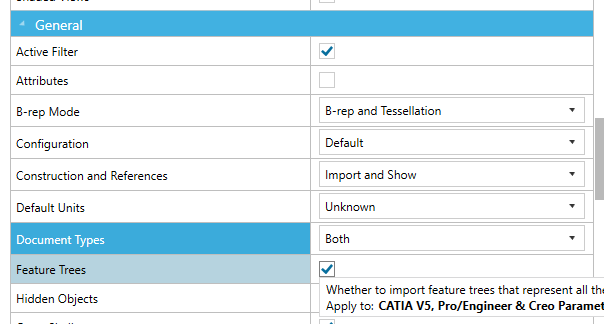
Go to the Options > Importers page. Open the specific importer options or open All Options. In the General section, select Feature Trees. Click OK. Open your native CAD file. Expand the assembly tree to view the Feature Tree data.
Go to the Options > Importers page.
Open the specific importer options or open All Options.
In the General section, select Feature Trees.
Open your native CAD file.
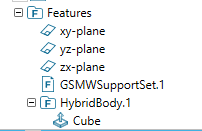
Expand the assembly tree to view the Feature Tree data.
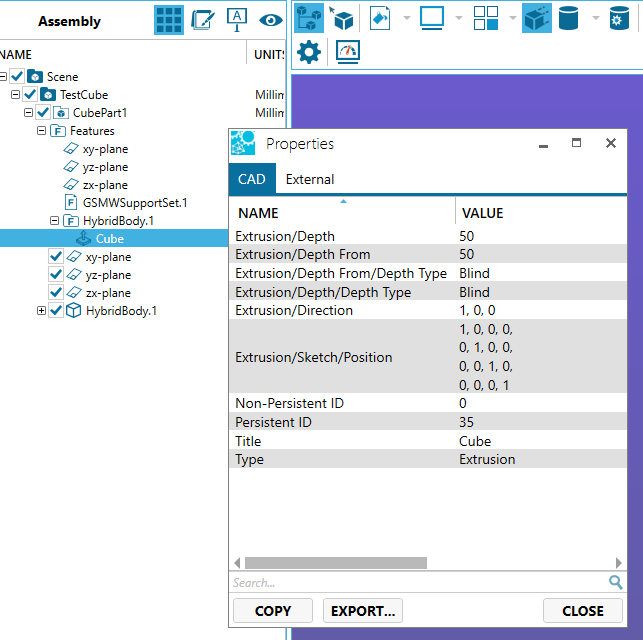
View the properties of a Feature Tree item by RMB on the item and selecting Properties.
Your Docs generative AI assistant. Ask me anything about SpinFire Insight or choose a sample question below to start a conversation:
SPINNY may store conversations according to OpenAI's policy. Responses may not always be accurate.