
Overview
Tetra4D Enrich allows you to create rich PDFs from supported 3D and CAD file formats, to consolidate this 3D information with other types of information (meta-data…), and to add into the PDF document advanced objects in order to ease the access to the product information.
Note: This user manual is based on the Acrobat Pro DC version of Tetra4D Enrich. All screen shots have been made using Acrobat Pro DC.
Tetra4D Enrich for Acrobat Pro
Adobe Acrobat Pro introduces a new user interface and Tetra4D Enrich fully integrates with this enhancement. In the new workspace, you can find the Tetra4D Enrich tools in the following area:
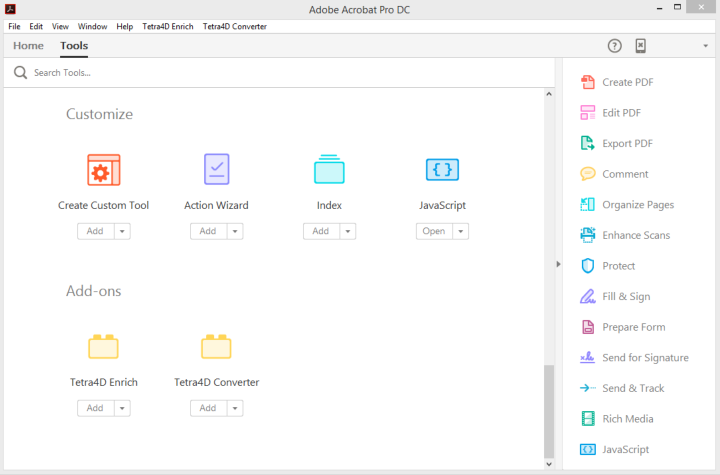
- Note: that Tetra4D Enrich product installs 2 plug-ins:
Tetra4D Enrich
Tetra4D Converter
The button below the Tetra4D Enrich and Tetra4D Converter icons have a few different options:
Open: Open the Tetra4D Enrich tools.
Add / Add Shortcut: Add a Tetra4D Enrich shortcut in the right pane.
Remove Shortcut: Remove the existing shortcut from the right pane.
For more information about the Acrobat Pro DC user interface, please refer to: https://helpx.adobe.com/acrobat/using/workspace-basics.html
Tetra4D Enrich for Acrobat Pro
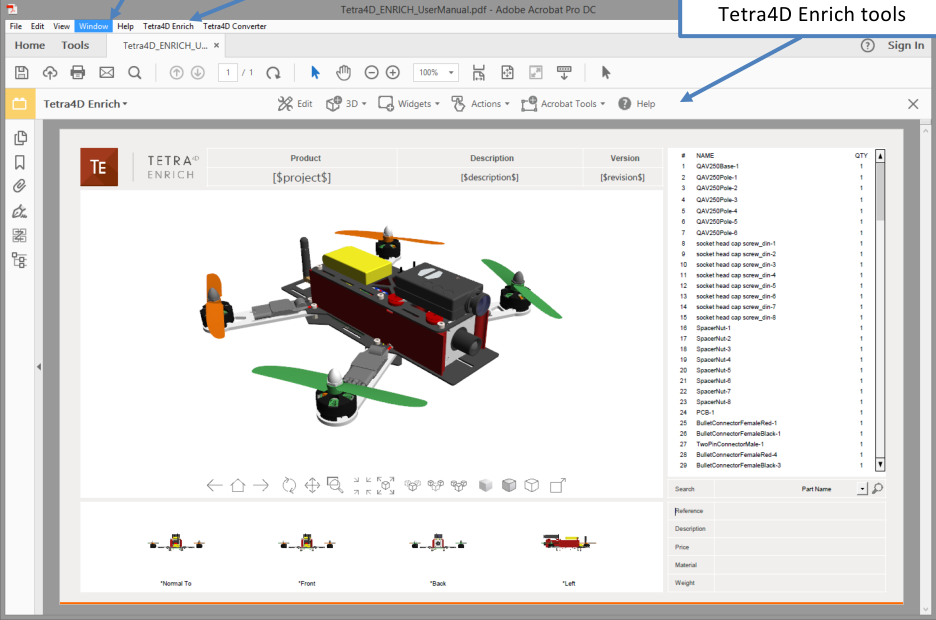
Tetra4D Enrich plug-in in Acrobat Pro DC
Tetra4D Enrich Tools Menu
Acrobat Pro

The Tetra4D Enrich top menu provides access to the different features of the product.
The following sections will explain how to use each of these features.