Similarity Search Workflow
Important
Purpose: This document is for Developers and Engineers using embeddings in Production Applications.
For an overview (concepts and choosing between pre-trained vs custom models), start with Embeddings & Similarity Search.
Prerequisites
import hoops_ai
from hoops_ai.ml.embeddings import HOOPSEmbeddings
from hoops_ai.ml import CADSearch
from pathlib import Path

# Set license
hoops_ai.set_license(hoops_ai.use_test_license(), validate=False)
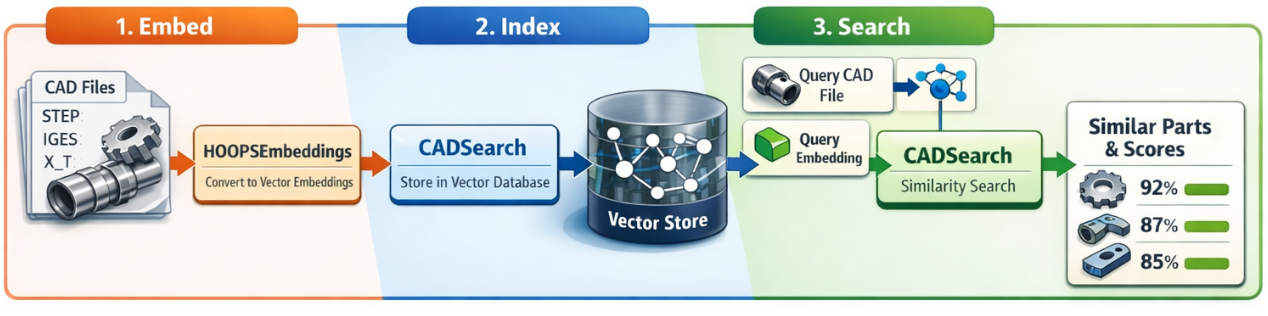
Step 1: Embed CAD Files
Single File Embedding
# Initialize the embeddings model
embedder = HOOPSEmbeddings(
    model="ts3d_scl_dual_v1",  # Pre-trained model name
    device="cpu"                # or "cuda" for GPU
)

# Embed a single CAD file (returns one Embedding per body)
body_embeddings = embedder.embed_shape("path/to/part.step")  # List[Embedding]

print(f"Bodies found: {len(body_embeddings)}")
for i, emb in enumerate(body_embeddings):
    print(f"  Body {i}: model={emb.model}, dim={emb.dim}, shape={emb.values.shape}")
    # e.g. Body 0: model=HOOPS_AI:ts3d_scl_dual_v1, dim=256, shape=(256,)
Note
A single CAD file may contain multiple bodies. embed_shape() returns a list of Embedding objects — one per body. For single-body parts the list will contain exactly one element.
Batch Embedding (Recommended for Multiple Files)
For processing multiple CAD files efficiently, use embed_shape_batch() which leverages multiprocessing:
# List of CAD file paths
cad_files = [
    "path/to/part1.step",
    "path/to/part2.stp",
    "path/to/part3.iges",
    "path/to/part4.step",
]

# Batch embed with parallel processing
embedding_batch = embedder.embed_shape_batch(
    cad_path_list=cad_files,
    num_workers=4,          # Number of parallel processes
    show_progress=True      # Show progress bar
)

# Inspect results
print(f"Successfully embedded: {len(embedding_batch.ids)} files")
print(f"Embedding matrix shape: {embedding_batch.values.shape}")  # (n_files, dim)
print(f"Failed: {embedding_batch.metadata['failed_count']}")
print(f"Model used: {embedding_batch.model}")
Key Benefits of Batch Processing:
✅ Parallel execution using process pools
✅ Model loaded once per worker process (efficient memory usage)
✅ Adaptive batching and RAM monitoring
✅ Progress tracking with tqdm
✅ Automatic error handling and reporting
Step 2: Index Embeddings for Search
Once you have an EmbeddingBatch, index it using CADSearch:
# Create CAD search with the embeddings model
searcher = CADSearch(shape_model=embedder)

# Index the embedding batch
searcher.index_shape(embedding_batch)

print("Embeddings indexed and ready for search!")
What happens during indexing: - Embeddings are stored in a FAISS vector store (default) - Part IDs from the batch are mapped to vectors - Metadata is cached for quick retrieval
Using a Custom Vector Store
from hoops_ai.ml.embeddings import FaissVectorStore

# Create custom FAISS store with specific configuration
custom_store = FaissVectorStore(
    dim=embedder.embedding_dim  # Match model's embedding dimension
)

# Index with custom store
searcher.index_shape(embedding_batch, vector_store=custom_store)
Step 3: Search for Similar Parts
Option A: Search by CAD File (Query-Time Embedding)
Search using a new CAD file — the model embeds it on-the-fly. Because a CAD file can contain multiple bodies, search_by_shape() returns a List[List[VectorHit]] — one inner list per unique (deduplicated) body.
# Search for parts similar to a query CAD file
body_results = searcher.search_by_shape(
    cad_path="path/to/query_part.step",
    top_k=10,                    # Return top 10 matches per body
    include_metadata=True,       # Include part metadata
    query_body_dedupe_eps=1e-4   # Cosine-distance threshold for deduplicating query bodies
)

# body_results is List[List[VectorHit]] — one list per unique body
for body_idx, hits in enumerate(body_results):
    print(f"\n=== Body {body_idx} ===")
    for hit in hits:
        print(f"  Part ID: {hit.id}")
        print(f"  Similarity Score: {hit.score:.4f}")
        print(f"  Metadata: {hit.metadata}")
Tip
For single-body query parts, body_results will contain one inner list. You can flatten with hits = body_results[0].
How it works:
Query CAD file is embedded (one embedding per body)
Near-duplicate body embeddings are grouped using
query_body_dedupe_epsFAISS search runs once per unique body group
Returns top-k most similar parts per unique body
Option B: Search by Pre-Computed Embedding
If you already have an embedding, search directly without re-embedding. search_by_embedding() takes a single Embedding and returns a flat List[VectorHit]:
# Compute embeddings once (returns List[Embedding], one per body)
body_embeddings = embedder.embed_shape("path/to/query_part.step")

# Search using the first body's embedding
results = searcher.search_by_embedding(
    query_embedding=body_embeddings[0],
    search_space="shape",        # "shape" or "text"
    top_k=10
)

for hit in results:
    print(f"Match: {hit.id} (score: {hit.score:.4f})")
When to use this:
You want to reuse the same query embedding multiple times
You’re comparing embeddings from different sources
You want to avoid re-computing embeddings
Option C: Search with Metadata Filters
Filter results based on metadata criteria:
# Search with filters (metadata must be provided during indexing)
results = searcher.search_by_shape(
    cad_path="query_part.step",
    top_k=20,
    filters={
    "category": "bracket",
    "material": "steel"
    }
)
Complete End-to-End Example
import hoops_ai
from hoops_ai.ml.embeddings import HOOPSEmbeddings
from hoops_ai.ml import CADSearch
from pathlib import Path

# Setup
hoops_ai.set_license(hoops_ai.use_test_license(), validate=False)

# Step 1: Prepare CAD files
cad_directory = Path("path/to/cad/library")
cad_files = [str(f) for f in cad_directory.glob("*.step")]

print(f"Found {len(cad_files)} CAD files to process")

# Step 2: Batch embed all files
embedder = HOOPSEmbeddings(model="ts3d_scl_dual_v1", device="cpu")

embedding_batch = embedder.embed_shape_batch(
    cad_path_list=cad_files,
    num_workers=8,
    show_progress=True
)

print(f"✓ Embedded {len(embedding_batch.ids)} files")
print(f"✗ Failed: {embedding_batch.metadata['failed_count']}")

# Step 3: Index embeddings
searcher = CADSearch(shape_model=embedder)
searcher.index_shape(embedding_batch)

print("✓ Indexed embeddings in vector store")

# Step 4: Search for similar parts
query_file = "path/to/new_part.step"

results = searcher.search_by_shape(
    cad_path=query_file,
    top_k=5
)

print(f"\nTop 5 similar parts to '{query_file}':")
for i, hit in enumerate(results, 1):
    print(f"{i}. {hit.id} - Similarity: {hit.score:.4f}")

# Clean up
searcher.close()
Persisting Indices for Reuse
When working with large datasets, re-computing embeddings and re-indexing can be time-consuming. The persistence API allows you to save computed indices to disk and reload them in future sessions.
Saving an Index
After indexing embeddings, save the vector store to disk:
# Build index from embeddings
searcher = CADSearch(shape_model=embedder)
searcher.index_shape(embedding_batch)

# Save to disk (works for both shape and text indices)
searcher.save_shape_index("parts_library.faiss")
This creates two files:
parts_library.faiss: FAISS index with vector data
parts_library.meta: Metadata (ID mappings, part metadata)
Loading a Saved Index
In a new session, skip indexing and load directly:
import hoops_ai
from hoops_ai.ml.embeddings import HOOPSEmbeddings
from hoops_ai.ml import CADSearch

# Setup (license and model)
hoops_ai.set_license(hoops_ai.use_test_license(), validate=False)
embedder = HOOPSEmbeddings(model="ts3d_scl_dual_v1", device="cpu")

# Create searcher and load pre-built index
searcher = CADSearch(shape_model=embedder)
searcher.load_shape_index("parts_library.faiss")

# Query immediately without indexing
results = searcher.search_by_shape("new_part.step", top_k=10)
Key Points:
✅ No re-indexing: Skip embedding computation entirely
✅ Faster startup: Load index in seconds vs. minutes/hours
✅ Portable: Share index files with team members
⚠️ Model consistency: Ensure the same shape_model is used for loading and querying
Complete Workflow Example
# ========== Session 1: Build and Save ==========
from hoops_ai.ml.embeddings import HOOPSEmbeddings
from hoops_ai.ml import CADSearch
from pathlib import Path

# Embed dataset
embedder = HOOPSEmbeddings(model="ts3d_scl_dual_v1")
cad_files = [str(f) for f in Path("parts_library").glob("*.step")]

embedding_batch = embedder.embed_shape_batch(
    cad_path_list=cad_files,
    num_workers=8,
    show_progress=True
)

# Index and save
searcher = CADSearch(shape_model=embedder)
searcher.index_shape(embedding_batch)
searcher.save_shape_index("production_parts.faiss")

print(f"Saved index with {len(cad_files)} parts")

# ========== Session 2: Load and Query ==========
# (On a different machine or after restart)
from hoops_ai.ml.embeddings import HOOPSEmbeddings
from hoops_ai.ml import CADSearch

# Load model and index
embedder = HOOPSEmbeddings(model="ts3d_scl_dual_v1")
searcher = CADSearch(shape_model=embedder)
searcher.load_shape_index("production_parts.faiss")

# Query immediately
results = searcher.search_by_shape("query_part.step", top_k=5)
for hit in results:
    print(f"{hit.id}: {hit.score:.4f}")
Text Index Persistence
The same pattern works for text embeddings:
# Save text index
searcher.index_text(text_embedding_batch)
searcher.save_text_index("text_descriptions.faiss")

# Load text index
searcher.load_text_index("text_descriptions.faiss")
results = searcher.search_by_text("steel bracket", top_k=10)
Cloud Vector Stores (Future)
For cloud-based stores (Weaviate, Qdrant, Pinecone), the persistence model differs:
# Example with Qdrant (future implementation)
from hoops_ai.ml.embeddings import QdrantVectorStore

# Data is already persisted on Qdrant server
searcher = CADSearch(shape_model=embedder)

# Load connection to existing collection
searcher.load_shape_index(
    "production_parts",  # Collection name
    vector_store_cls=QdrantVectorStore  # Specify cloud store
)

# Query directly (data already on server)
results = searcher.search_by_shape("query.step", top_k=10)
Persistence Comparison:
Vector Store |
|
|
|---|---|---|
FAISS (local) |
Serialize index to disk |
Deserialize from file |
Weaviate |
Save connection config |
Reconnect to cloud index |
Qdrant |
Save connection config |
Reconnect to cloud collection |
Pinecone |
Save connection config |
Reconnect to cloud index |
Advanced Usage
Reusing the Shape Model for Multiple Queries
The shape_model passed to CADSearch is reused for all queries, avoiding model reloads:
# Initialize once
embedder = HOOPSEmbeddings(model="ts3d_scl_dual_v1")
searcher = CADSearch(shape_model=embedder)

# Index your dataset
searcher.index_shape(embedding_batch)

# Query multiple times - model is already loaded
results1 = searcher.search_by_shape("query1.step", top_k=10)
results2 = searcher.search_by_shape("query2.step", top_k=10)
results3 = searcher.search_by_shape("query3.step", top_k=10)
Using Custom Trained Models
If you’ve trained a custom embedding model using EmbeddingFlowModel, register it for production use:
# Register custom model (trained via EmbeddingFlowModel + FlowTrainer)
HOOPSEmbeddings.register_model(
    model_name="my_custom_model_v1",
    checkpoint_path="flows/my_embedding_flow/ml_output/0107/143022/best.ckpt"
)

# Use it just like a pre-trained model
embedder = HOOPSEmbeddings(model="my_custom_model_v1", device="cpu")
embedding_batch = embedder.embed_shape_batch(cad_files, num_workers=4)

# Model ID will be prefixed with "CUSTOM:"
print(embedding_batch.model)  # "CUSTOM:my_custom_model_v1"
How to train custom models: See the Shape Embeddings Model for:
Training workflow with EmbeddingFlowModel + FlowTrainer
Configuring model architecture and hyperparameters
Evaluating model performance
Best practices for custom model training
API Reference Summary
HOOPSEmbeddings
Method |
Description |
|---|---|
|
Embed single CAD file → |
|
Batch embed multiple files → |
|
Register custom trained model |
|
List pre-trained models |
CADSearch
Method |
Description |
|---|---|
|
Index shape embeddings for search |
|
Index text embeddings for search |
|
Search by CAD file (on-the-fly embedding) |
|
Search by text description |
|
Search by pre-computed embedding |
|
Save shape index to disk for reuse |
|
Save text index to disk for reuse |
|
Load pre-built shape index from disk |
|
Load pre-built text index from disk |
|
Clean up resources |
EmbeddingBatch
Attribute |
Description |
|---|---|
|
NumPy array of shape |
|
Model identifier string |
|
Embedding dimensionality |
|
List of part IDs (file paths) |
|
Dict with batch-level info |