
Logo

Getting Started

  • Technical Overview
  • File Formats
  • Supported Platforms
  • Evaluate & Install

Programming Guide

  • CAD Fundamentals
    • Overview
    • What is CAD?
    • Types of CAD Representations
      • Boundary Representation (B-rep)
      • Mesh Representation
    • B-rep Topology Hierarchy
      • The B-rep Hierarchy
      • Vertices
      • Edges
      • Faces
      • Shells
      • Bodies (Solids)
      • Model (Assembly)
    • B-rep Topology vs. Geometry
      • Topology
      • Geometry
    • UV Grids: Sampling Face Geometry
      • What are UV Coordinates?
      • UV Grids in Machine Learning
    • Face Adjacency Graphs
      • What is a Face Adjacency Graph?
      • Building Face Adjacency Graphs
      • Graph Properties for ML
    • From CAD to Graph Neural Networks
      • Mapping B-rep to GNN
    • Advanced B-rep Concepts
      • Dihedral Angles
      • Surface Curvature
      • Machining Features
    • CAD File Formats
    • Coordinate Systems and Units
      • Coordinate System
      • Units
    • Best Practices for CAD ML
      • 1. Understand Your Data
      • 2. Normalize Features
      • 3. Handle Variable Graph Sizes
      • 4. Augmentation for CAD Data
      • 5. Feature Selection
    • Next Steps
  • Machine Learning Fundamentals
    • Overview
    • What is Machine Learning?
      • Types of Machine Learning Tasks
    • Neural Networks Basics
      • What is a Neural Network?
      • Key Components
      • Training Process
    • Graph Neural Networks (GNNs)
      • Why GNNs for CAD Data?
      • Graph Representation of CAD Models
      • How GNNs Work
      • Common GNN Architectures
      • Point Cloud Networks
      • Convolutional Neural Networks (CNNs)
      • Hybrid Architectures for CAD
    • PyTorch and PyTorch Lightning
      • PyTorch Basics
      • PyTorch Lightning
    • DGL: Deep Graph Library
      • DGL Graph Structure
    • PyTorch Geometric: Alternative Graph Library
      • When You Might See PyTorch Geometric
      • PyG Graph Structure
    • Loss Functions
      • Cross-Entropy Loss (Classification)
      • Binary Cross-Entropy (Node Classification)
      • Mean Squared Error (Regression)
    • Advanced Concepts
      • Transfer Learning and Domain Adaptation
      • Regularization Techniques
      • Attention Mechanisms
      • Self-Supervised Learning
    • Best Practices for CAD Machine Learning
      • Data Quality
      • Feature Engineering
      • Model Training
      • Debugging ML Models
    • Resources and Further Reading
    • Next Steps
  • Data Flow Management
    • CAD Data Access
    • CAD Data Encoding
    • Datasets - ML-Ready Inputs
    • Data Storage
      • Data Merging in HOOPS AI
    • Data Flow Customisation
      • Flow module - Quick Reference
  • Machine Learning Model
    • Dataset Exploration and Mining
    • Parts Classification Model
    • CAD Feature Recognition Model
    • Embeddings & Similarity Search
      • Similarity Search Workflow
      • Search Results Visualization
      • Train a Shape Embedding Model
    • Develop Your own ML Model
  • Data Visualization Experience

Python API Reference

  • hoops_ai Module
    • hoops_ai.cadaccess
      • hoops_ai.cadaccess.HOOPSLoader
      • hoops_ai.cadaccess.HOOPSModel
      • hoops_ai.cadaccess.HOOPSTools
      • hoops_ai.cadaccess.HOOPSBrep
      • hoops_ai.cadaccess.HOOPSMesh
    • hoops_ai.cadencoder
      • hoops_ai.cadencoder.BrepEncoder
    • hoops_ai.dataset
      • hoops_ai.dataset.DatasetExplorer
      • hoops_ai.dataset.DatasetLoader
      • hoops_ai.dataset.CADDataset
      • hoops_ai.dataset.TorchCADDataset
      • hoops_ai.dataset.GraphDataset
      • hoops_ai.dataset.CADSearch
    • hoops_ai.flowmanager
      • hoops_ai.flowmanager.flow
      • hoops_ai.flowmanager.flow_builder
      • hoops_ai.flowmanager.ParallelExecutor
    • hoops_ai.ml
      • hoops_ai.ml.EXPERIMENTAL
      • hoops_ai.ml.embeddings
      • hoops_ai.ml.FlowInference
      • hoops_ai.ml.FlowTrainer
      • hoops_ai.ml.FlowModel
      • hoops_ai.ml.MetricExplorer
      • hoops_ai.ml.CADSearch
    • hoops_ai.storage
      • hoops_ai.storage.datasetstorage
      • hoops_ai.storage.DataStorage
      • hoops_ai.storage.MemoryStorage
      • hoops_ai.storage.MLStorage
      • hoops_ai.storage.DGLGraphStoreHandler
      • hoops_ai.storage.LabelStorage
      • hoops_ai.storage.MetricStorage
      • hoops_ai.storage.CADFileRetriever
      • hoops_ai.storage.LocalStorageProvider
      • hoops_ai.storage.convert_storage
    • hoops_ai.insights
      • hoops_ai.insights.utils
      • hoops_ai.insights.CADViewer
      • hoops_ai.insights.DatasetViewer
      • hoops_ai.insights.quick_view
    • hoops_ai.set_license
    • hoops_ai.get_license_info
    • hoops_ai.use_test_license
    • hoops_ai.create_flow

Tutorials

  • 1. Accessing a CAD File
    • HOOPS AI: CAD Access Module
    • Holes extraction for specific CAD files.
    • Interactive 3D Visualization with HOOPS AI Insights
  • 2. Encoding a CAD File
    • HOOPS AI: Encoder Module
    • View your cad model in the notebook
    • BRep data as numerical features for ML
    • Encoding the Geometry
    • Encoding the attributes
  • 3. HOOPS AI - Minimal ETL Demo
    • HOOPS AI - Minimal ETL Demo
    • DATA SERVING : Use the DatasetExplorer to navigate your data
  • 4. Fabwave - Part Classification using HOOPS AI
    • Fabwave - Part Classification using HOOPS AI
    • Data Transformation : Encoded data to be used as ml input
    • Machine Learning Training
  • 5. Data Mining a 5K CAD Dataset
    • Use the Dataset Explorer to navigate the dataset
    • Gather files that fulfilled a given condition. Filter
    • Query data for single file
  • 6. Data Mining a 162K CAD Dataset
    • HOOPS AI: Use the Dataset Explorer to navigate the dataset
    • Gather files that fulfilled a given condition. Filter
    • Query data for single file
  • 7. Train a Machine Learning Model For Parts Classification
    • HOOPS AI: EXPERIMENTAL - Flow Trainer
    • Make inference, test your current trained model
  • 8. Infer Features using CAD as Input
    • HOOPS AI: Using a Pre-trained Model
    • ML prediction
    • Visualize Predictions on CAD Model
    • A second case
  • 9. CAD Similary Search using HOOPS EMBEDDINGS
    • CAD Similary Search using HOOPS EMBEDDINGS

Additional Resources

  • Release Notes
    • HOOPS AI 1.0-b2
    • HOOPS AI 1.0-preview
    • Fixed Bugs List
  • Public Roadmap
  • Acknowledgments
  • Distribute Your Application
  • Downloads
  • Glossary
  • Archives

Support

  • Forum
  • Knowledge Base
  • Support
  • Contact Us
HOOPS AI
  • Machine Learning Model
  • Embeddings & Similarity Search
  • View page source
Previous Next

Embeddings & Similarity Search

Table of Contents

  • Concepts

  • Production Workflow (3 Steps)

  • When to Train Custom Models

  • Using Pre-trained vs Custom Models

Important

Purpose: This document is for Developers and Engineers who want an overview of shape embeddings and similarity search.

For training custom models, see the Shape Embeddings Model.

For the end-to-end production workflow (embed, index, search, persist), see Similarity Search Workflow.

This page covers the core concepts and helps you choose between using a pre-trained model vs training a custom one.

Concepts

If you’re new to the topic, here are the core ideas in plain terms.

Embeddings

An embedding is a numeric representation of an object (for example a CAD part) as a fixed-length vector of numbers. The goal is that similar things end up close together in that vector space.

  • An embedding turns something complex (a 3D shape, text, an image) into a vector like: [0.12, -0.03, ...].

  • Once objects are vectors, you can compare them using distance/similarity metrics (commonly cosine similarity or Euclidean distance).

  • A good embedding model is trained so that “similar” in your domain corresponds to “nearby” in the embedding space.

Retrieval (Similarity Search)

Retrieval (often called vector search or similarity search) is the process of:

  1. Creating an embedding for a query (e.g., a new CAD file)

  2. Searching an index of existing embeddings

  3. Returning the nearest neighbors (the most similar items)

Because datasets can be large, embeddings are typically stored in a specialized vector index (e.g., FAISS) to make nearest-neighbor search fast.

What Is a Shape Embedding?

A shape embedding is an embedding specifically for 3D geometry. In HOOPS AI, a shape embedding model maps a CAD file (STEP/IGES/etc.) into a vector such that parts with similar geometry tend to have similar vectors.

  • Use shape embeddings to find CAD parts that “look like” a query part.

In this guide:

  • HOOPSEmbeddings computes shape embeddings from CAD files.

  • CADSearch indexes those vectors and performs fast retrieval.

Overview

The HOOPSEmbeddings API provides production-ready tools for:

  • ✅ Computing embeddings from CAD files (single or batch)

  • ✅ Vector database connectors (FAISS, with Qdrant/Weaviate/Pinecone support planned)

  • ✅ Similarity search and retrieval in optimized vector spaces

  • ✅ Pre-trained models ready to use out-of-the-box

  • ✅ Custom model support via model registration

Production Workflow (3 Steps)

  1. Embed: Convert CAD files to vector embeddings using HOOPSEmbeddings

  2. Index: Store embeddings in a vector store using CADSearch

  3. Search: Query for similar parts using CAD files or embeddings
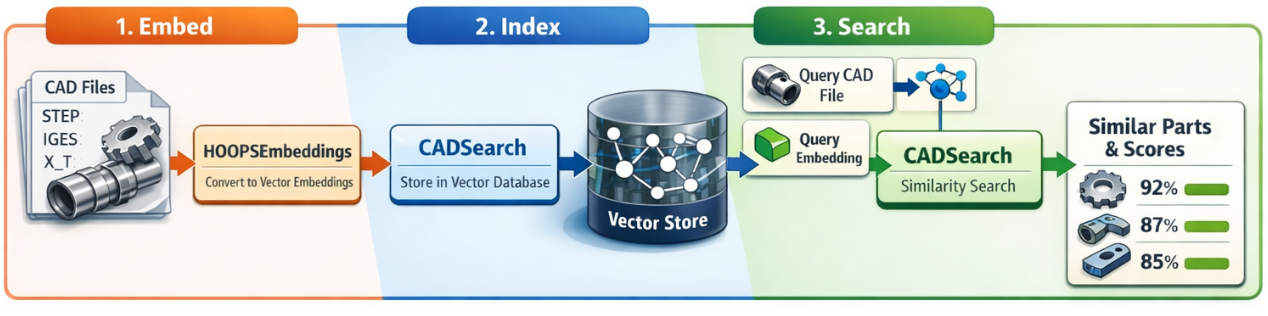
Embeddings Retrieval Workflow

When to Train Custom Models

  • Your CAD parts have unique geometric characteristics not captured by pre-trained models

  • You need domain-specific embeddings (e.g., specific industry, manufacturing process)

  • You have a large proprietary dataset to learn from

  • You want to optimize embedding dimensions for your use case

Note: HOOPS AI’s provided a pre-trained model (e.g., ts3d_scl_dual_v1) that can be used directly. See the production guide on how to use it directly. Trained on a large dataset with nearly 1M parts from public datasets (ABC, fabwave, etc).

Using Pre-trained vs Custom Models

Pre-trained Models (Recommended for most users):

# Use HOOPS AI's pre-trained model - no training required!
embedder = HOOPSEmbeddings(model="ts3d_scl_dual_v1")

Custom Trained Models (For specialized domains):

# Register your custom model (trained using EmbeddingFlowModel)
HOOPSEmbeddings.register_model(
    model_name="my_custom_model",
    checkpoint_path="/path/to/best.ckpt"
)

# Use your custom model
embedder = HOOPSEmbeddings(model="my_custom_model", device="cpu")

Want to train a custom model? See the Shape Embeddings Model.

  • For the full production workflow (embed, index, search, and persist indices), see Similarity Search Workflow.

  • For training custom embedding models, see Train a Shape Embedding Model.

  • For visualizing retrieval hits, see Search Results Visualization.

Previous Next

© Copyright 2025, Tech Soft 3D

Welcome Conversation saved
HOOPSY BETA

Hello! I'm HOOPSY

Your multilingual generative AI assistant for documentation. Ask me anything about HOOPS AI in your own language, or choose a sample question below to start a conversation:

What is HOOPS AI?
What are the latest release notes for HOOPS AI?
How do I start evaluating HOOPS AI?
How do I write my first sample application?
How can I get assistance?

HOOPSY may store conversations according to OpenAI's policy. Responses may not always be accurate.

HOOPSY is thinking...
Return to top