
Predicting multiple categories with the HOOPS AI Context Layer
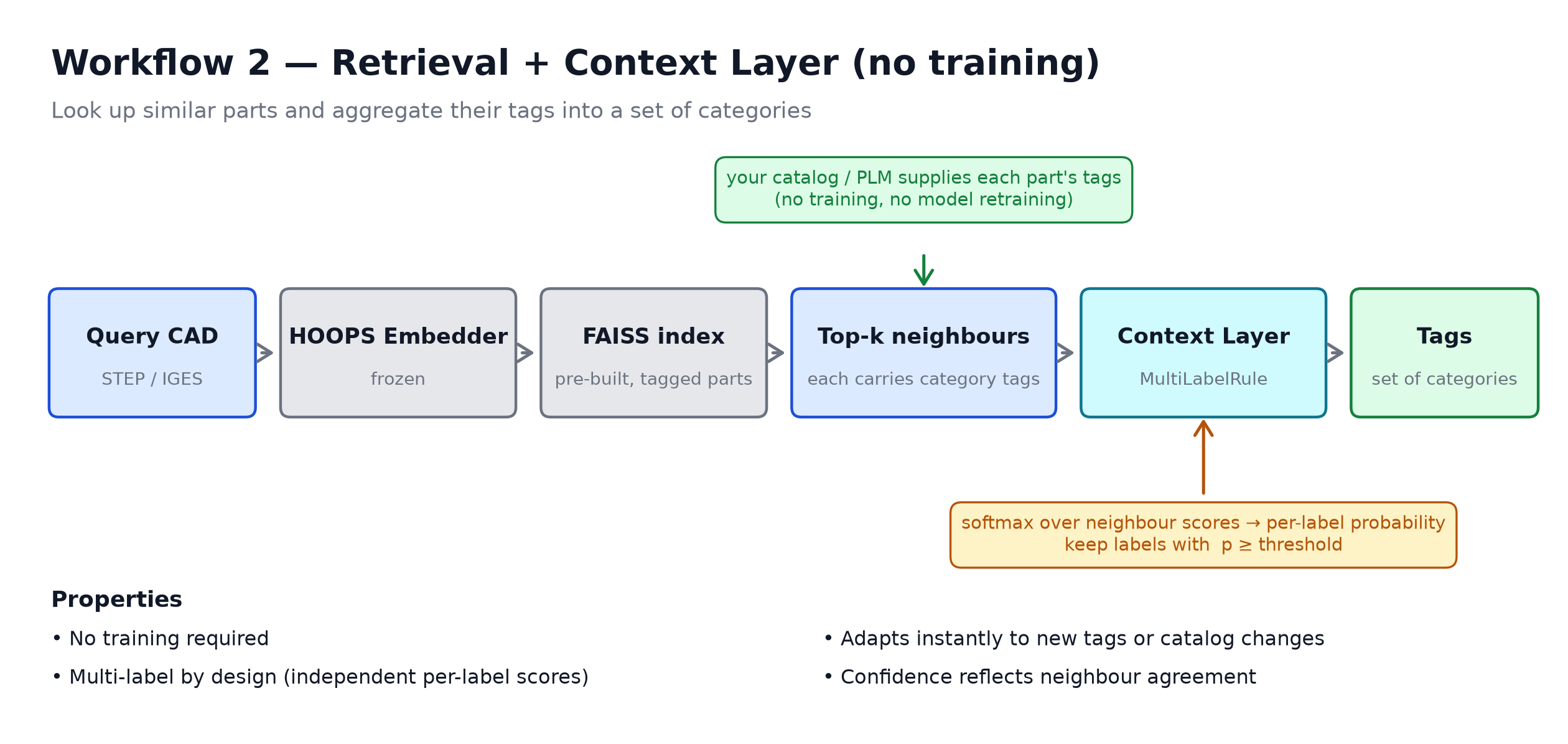
This tutorial combines CAD similarity search with the Context Layer to assign several categories at once to a query part — a multi-label problem.
A part rarely belongs to a single group. In a furniture catalog one product can be Accessories, Casegoods and Storage at the same time; in mechanical design a flanged bushing is Rotational, Sealing and Mounting all at once. A classifier that outputs only one label cannot describe these parts.
The idea in one line: shape retrieval finds the parts that look like the query, each neighbour already carries a set of category tags, and the Context Layer aggregates those tags into the set of categories that best fits the query — no model retraining required.
Single-label vs. multi-label. The built-in CategoricalRule answers “which one category wins?” (softmax over neighbours, then argmax). Here we plug in a small custom MultiLabelRule that answers “which categories apply?” — it scores every category independently (a sigmoid-like vote) and keeps each one above a threshold. This is the same change you would otherwise make to a trained model’s loss (cross-entropy → binary cross-entropy) and activation (softmax → sigmoid),
expressed at the aggregation layer so you can try it immediately.
Prerequisites — indexed database: This notebook loads a pre-built FAISS index produced by `demo_HOOPS_Embeddings_indexing.ipynb <./demo_HOOPS_Embeddings_indexing.ipynb>`__. Run that notebook first if you haven’t already.
API reference: hoops_ai.ml.context_layer
Dataset
This notebook uses the TMCAD dataset (Truly Mechanical CAD Dataset):
Zou, Q., & Zhu, L. (2025). Bringing attention to CAD: Boundary representation learning via transformer. Computer-Aided Design, 103940.
TMCAD v2 (recommended): https://pan.zju.edu.cn/share/218d10a88e8c18f5b96e94a7e0
Documentation: https://github.com/Qiang-Zou/BRT/blob/main/DATASET.md
~10,000 STEP models across 10 mechanical part categories. Released under GPL-3.0.
Workflow at a glance
[1]:
import hoops_ai
import os
import sys

license_key = os.environ.get("HOOPS_AI_LICENSE")
if not license_key:
    sys.exit("HOOPS_AI_LICENSE environment variable is required.")

hoops_ai.set_license(license_key, validate=True)
------------------------------------------------------------
HOOPS AI
------------------------------------------------------------
  Platform      : Windows 11
  Architecture  : AMD64
  Python        : 3.12.10
------------------------------------------------------------
  Core          : hoops-ai             1.2.0.dev
  CAD Access    : hoops-exchange       26.2.0  (build: 1e11169 2026-06-12T10:38:16Z)
  Conversion    : hoops-converter      26.1.1  (build: 00dc9f6 2026-06-12T10:22:46Z)
  Insights      : hoops-web-viewer     26.1.1  (build: d30058f 2026-06-12T10:22:25Z)
------------------------------------------------------------
======================================================================
[OK] HOOPS AI License: Valid
======================================================================
Configure
[2]:
from hoops_ai.ml.embeddings import HOOPSEmbeddings, Embedding, EmbeddingBatch
import pathlib

packages_dir = pathlib.Path.cwd().parent.joinpath("packages")
pretrained_model = packages_dir.joinpath("trained_ml_models", "ts3d_2M_hoops_embeddings_SIGNAL-preview.ckpt")
demo_cad_files_folder = packages_dir.joinpath("vectorstores","tmcad","queries_for_demo")
indexed_database = packages_dir.joinpath("vectorstores","tmcad","TMCAD_SIGNAL.faiss")

# Register your custom model (trained using EmbeddingFlowModel)
HOOPSEmbeddings.register_model(
    model_name="HOOPS Embeddings SIGNAL preview",
    checkpoint_path=str(pretrained_model)
)

print(HOOPSEmbeddings.list_available_models())
['HOOPS Embeddings SIGNAL preview']
1. Set up the CAD similarity search
Register the pre-trained model, load the FAISS index built in `demo_HOOPS_Embeddings_indexing.ipynb <./demo_HOOPS_Embeddings_indexing.ipynb>`__, and point to a folder of query CAD files. These are the same retrieval building blocks used throughout the embeddings tutorials.
[3]:
embedder = HOOPSEmbeddings(model="HOOPS Embeddings SIGNAL preview")

print(f"Using model: {embedder.model_name} with dimension: {embedder.embedding_dim}")
Successfully loaded model from checkpoint: c:\Users\LuisSalazar.LY-LS-LEGION\Documents\repos\HOOPS-AI-tutorials\packages\trained_ml_models\ts3d_2M_hoops_embeddings_SIGNAL-preview.ckpt
Using model: HOOPS Embeddings SIGNAL preview with dimension: 2048
[4]:
from hoops_ai.storage import CADFileRetriever, LocalStorageProvider

retriever = CADFileRetriever(storage_provider=LocalStorageProvider(directory_path=demo_cad_files_folder), formats=[".stp", ".step", ".iges", ".igs"])

# Get files using the library's retriever
cad_files = retriever.get_file_list()
print(len(cad_files), "files found." )
20 files found.
[5]:
from hoops_ai.ml import CADSearch

loaded_searcher = CADSearch(shape_model=embedder)

embeddingBatch = loaded_searcher.load_shape_index(path=str(indexed_database))

print(f"Loaded {len(embeddingBatch.ids)} part embeddings (dim={embeddingBatch.values.shape[1]}).")
Loaded 39736 part embeddings (dim=2048).
[6]:
from hoops_ai.insights import DatasetViewer

ds_viewer = DatasetViewer([], [], [], reference_dir=packages_dir.joinpath("vectorstores","tmcad","images_tmcad"))
2. From one label to many
Once retrieval tells us which parts look like the query, the Context Layer aggregates the metadata of those neighbours. Three objects from `hoops_ai.ml.context_layer <https://docs.techsoft3d.com/hoops/ai/api_ref/hoops_ai.ml.context_layer.html>`__ are involved:
Object |
Role |
|---|---|
|
Supplies metadata for a list of part ids. Here it returns each part’s list of categories. It lives in |
|
Defines how neighbour values are combined. The built-in |
|
Orchestrates the prediction. |
The only change needed for multi-label is the rule. CategoricalRule returns the single argmax category; MultiLabelRule scores every category independently and keeps each one above a threshold. The next section shows exactly how — in ~25 lines you can edit.
2.1 — Inside MultiLabelRule (the part you can change)
MultiLabelRule turns neighbour evidence into a set of categories in three numerical steps. For one query the predictor hands the rule:
values— each neighbour’s list of categories \(L_i\).scores— the matching cosine similarities \(s_i \in [0, 1]\).
Step 1 — weight the neighbours (softmax over scores). Closer neighbours count more, so we soften the scores into weights with a temperature \(\tau\):
Larger \(\tau\) concentrates the vote on the closest matches; \(\tau = 0\) makes every neighbour count equally. Same softmax you know — but over neighbours, not labels.
Step 2 — one independent probability per label (the sigmoid analogue). For each category \(\ell\) we sum the weight of the neighbours that carry it:
These probabilities are independent — they do not sum to 1 across labels, so a part can score high on several categories at once.
Step 3 — threshold (the decision). Keep every category whose probability clears \(\theta\):
CategoricalRule instead runs softmax across the labels then argmax — a single winner. The two rules share Step 1 and differ only in Steps 2–3.
Knobs you may want to change: the weighting kernel in Step 1 (raw scores, a Gaussian distance kernel, or a hard top-\(k\) cutoff), the threshold \(\theta\) in Step 3 (per category, or calibrated on a validation set), class priors before thresholding, or the confidence summary. The implementation below is intentionally short so you can edit any of these in place.
[ ]:
import numpy as np
from hoops_ai.ml.context_layer import AggregationRule, ContextPrediction


def score_labels(label_lists, scores, *, temperature: float = 8.0) -> dict[str, float]:
    """Steps 1 + 2: an independent probability per label (the multi-label 'sigmoid').

    Returns ``{label: probability}`` with each probability in [0, 1]. The probabilities are
    computed per label and do NOT sum to 1 across labels — that is what makes this
    multi-label rather than single-winner.
    """
    if not label_lists:
        return {}
    scores = np.asarray(scores, dtype=np.float64)
    # Step 1 — softmax over neighbour similarity scores (temperature = how sharply the
    # closest neighbours dominate the vote).
    weights = np.exp(temperature * (scores - scores.max()))
    weights /= weights.sum()
    # Step 2 — accumulate each label's weight across the neighbours that carry it.
    probabilities: dict[str, float] = {}
    for labels, weight in zip(label_lists, weights):
        labels = [labels] if isinstance(labels, str) else list(labels)
        for label in labels:
            probabilities[label] = probabilities.get(label, 0.0) + float(weight)
    return probabilities


class MultiLabelRule(AggregationRule):
    """Predict a SET of categories by independent per-label thresholding.

    Subclasses the library's ``AggregationRule``, so ``ContextPredictor`` treats it like
    any other rule. To change the behaviour, edit the math in :func:`score_labels` (the
    weighting / scoring) or the threshold logic in :meth:`predict` (the decision).
    """

    def __init__(self, threshold: float = 0.35, temperature: float = 8.0) -> None:
        self.threshold = threshold
        self.temperature = temperature

    def predict(self, values, scores, key):
        probabilities = score_labels(values, scores, temperature=self.temperature)
        if not probabilities:
            return None
        ranked = sorted(probabilities.items(), key=lambda item: item[1], reverse=True)
        # Step 3 — keep every label above the threshold (the decision / activation).
        selected = [label for label, prob in ranked if prob >= self.threshold]
        rejected = [(label, prob) for label, prob in ranked if prob < self.threshold]
        if not selected:
            return None
        confidence = float(np.mean([probabilities[label] for label in selected]))
        return ContextPrediction(
            value=selected,
            confidence=confidence,
            evidence_count=len(values),
            alternatives=[{"value": label, "confidence": prob} for label, prob in rejected[:4]],
        )
3. The example catalog (mock — not part of the library)
multilabel_database.py provides MultiLabelContextProvider: a ContextProvider subclass that synthesises deterministic, multi-label records from each file’s stem so the notebook runs without a real catalog. Each record is a {"Categories": [...]} list drawn from six overlapping mechanical groups: Rotational, Fastening, Structural, Housing, Sealing, Mounting.
To mimic a real, partially-tagged catalog it deliberately leaves gaps:
The top hit is always empty — the query’s nearest geometric twin is not tagged yet, so the predictor must aggregate categories from the rest of the neighbourhood.
About 20 % of the other parts are untagged; the rest carry one to three categories.
About 70 % of queries fall into a “shape family” that shares 2-3 categories (with light per-part noise), so the predictor can recover a confident multi-label set. The rest stay divided, giving sparser, lower-confidence predictions.
In your own project, replace
MultiLabelContextProviderwith aContextProvidersubclass backed by your real catalog or PLM — onlyget_contextsneeds to return the list of categories per part.
[ ]:
import importlib, multilabel_database
importlib.reload(multilabel_database)
from multilabel_database import MultiLabelContextProvider, TAGS, CATEGORY_KEY

from hoops_ai.ml.context_layer import ContextPredictor
from hoops_ai.insights import predictions_table, hits_table

# search_by_shape returns a list-of-lists (one neighbour list per query);
# we always work on the first query.
part_index = 0

# --- Example-only mock. Swap for your own ContextProvider in production. ---
context_provider = MultiLabelContextProvider()

# --- MultiLabelRule + score_labels are defined above, in this notebook, so the
#     softmax/threshold logic is fully editable here. ---
multilabel_rule = MultiLabelRule(threshold=0.35, temperature=8.0)

# --- The predictor: route the "Categories" key to the multi-label rule. ---
predictor = ContextPredictor(
    context_provider,
    per_key_rules={CATEGORY_KEY: multilabel_rule},
)

print("Category vocabulary:", list(TAGS))
Category vocabulary: ['Rotational', 'Fastening', 'Structural', 'Housing', 'Sealing', 'Mounting']
4. Predict the categories
For each query we:
Run a shape search with
loaded_searcher.search_by_shape(query, top_k=...).Inspect the neighbours and their category tags with
hits_table.Call
predictor.infer(hits, keys=["Categories"])and render the result withpredictions_table.
Because the key is handled by MultiLabelRule, each ContextPrediction.value is now a list of categories rather than a single value.
Example 1 — a clear shape family
The neighbours mostly share the same 2-3 categories. We expect MultiLabelRule to recover that whole set, each category sitting comfortably above the threshold.
[8]:
query = str(cad_files[1])
print(f"Querying with: {query}")
hits = loaded_searcher.search_by_shape(query, top_k=15, filters={"kind": "part"})

ds_viewer.show_search_results(hits, query_file=query, grid_cols=5)
Querying with: c:\Users\LuisSalazar.LY-LS-LEGION\Documents\repos\HOOPS-AI-tutorials\packages\vectorstores\tmcad\queries_for_demo\1.stp
Reusing 15 existing PNGs and generating 0 new PNGs...
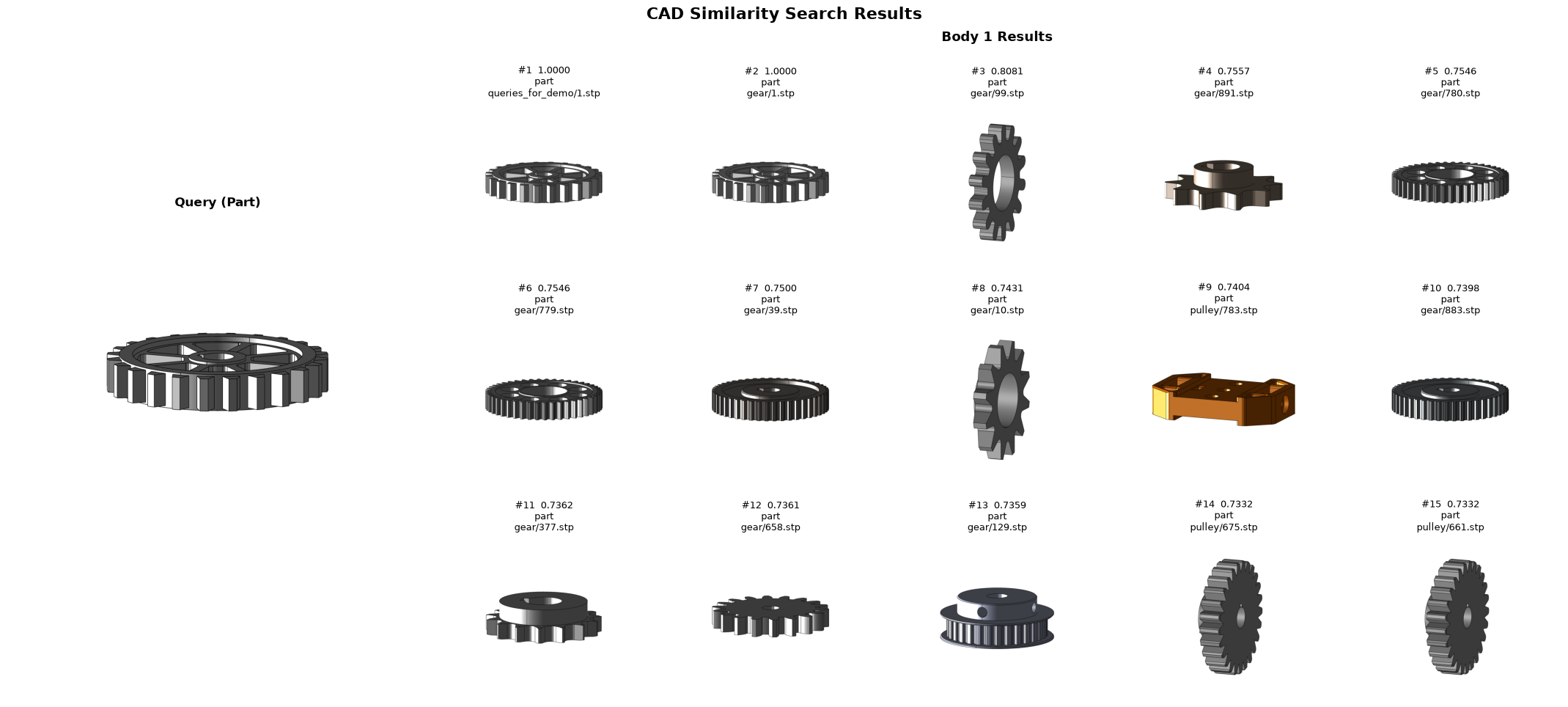
[9]:
# The categories attached to each neighbour. Note that many parts carry several at once,
# and the top hit (the query's nearest twin) has no tags yet.
metadata_by_id = context_provider.get_contexts([h.id for h in hits[part_index]])
hits_table(hits[part_index], metadata_by_id, keys=[CATEGORY_KEY])
[9]:
| id | score | Categories | |
|---|---|---|---|
| rank | |||
| 1 | C:\Users\LuisSalazar.LY-LS-LEGION\Documents\data\TMCAD_dataset_v2\queries_for_demo\1.stp | 1.00 | — |
| 2 | C:\Users\LuisSalazar.LY-LS-LEGION\Documents\data\TMCAD_dataset_v2\gear\1.stp | 1.00 | — |
| 3 | C:\Users\LuisSalazar.LY-LS-LEGION\Documents\data\TMCAD_dataset_v2\gear\99.stp | 0.81 | ['Housing', 'Sealing'] |
| 4 | C:\Users\LuisSalazar.LY-LS-LEGION\Documents\data\TMCAD_dataset_v2\gear\891.stp | 0.76 | ['Rotational'] |
| 5 | C:\Users\LuisSalazar.LY-LS-LEGION\Documents\data\TMCAD_dataset_v2\gear\780.stp | 0.75 | ['Rotational', 'Sealing'] |
| 6 | C:\Users\LuisSalazar.LY-LS-LEGION\Documents\data\TMCAD_dataset_v2\gear\779.stp | 0.75 | ['Structural'] |
| 7 | C:\Users\LuisSalazar.LY-LS-LEGION\Documents\data\TMCAD_dataset_v2\gear\39.stp | 0.75 | ['Sealing'] |
| 8 | C:\Users\LuisSalazar.LY-LS-LEGION\Documents\data\TMCAD_dataset_v2\gear\10.stp | 0.74 | ['Housing', 'Rotational'] |
| 9 | C:\Users\LuisSalazar.LY-LS-LEGION\Documents\data\TMCAD_dataset_v2\pulley\783.stp | 0.74 | ['Sealing'] |
| 10 | C:\Users\LuisSalazar.LY-LS-LEGION\Documents\data\TMCAD_dataset_v2\gear\883.stp | 0.74 | ['Fastening'] |
| 11 | C:\Users\LuisSalazar.LY-LS-LEGION\Documents\data\TMCAD_dataset_v2\gear\377.stp | 0.74 | ['Housing', 'Sealing'] |
| 12 | C:\Users\LuisSalazar.LY-LS-LEGION\Documents\data\TMCAD_dataset_v2\gear\658.stp | 0.74 | ['Sealing'] |
| 13 | C:\Users\LuisSalazar.LY-LS-LEGION\Documents\data\TMCAD_dataset_v2\gear\129.stp | 0.74 | ['Sealing'] |
| 14 | C:\Users\LuisSalazar.LY-LS-LEGION\Documents\data\TMCAD_dataset_v2\pulley\675.stp | 0.73 | — |
| 15 | C:\Users\LuisSalazar.LY-LS-LEGION\Documents\data\TMCAD_dataset_v2\pulley\661.stp | 0.73 | — |
[10]:
# The prediction value is a LIST of categories — every label that cleared the threshold.
predictions = predictor.infer(hits[part_index], keys=[CATEGORY_KEY])
predictions_table(predictions)
[10]:
| value | confidence | status | coverage | |
|---|---|---|---|---|
| key | ||||
| Categories | ['Sealing'] | 65% | ready_to_propose | 11/15 |
[11]:
# Look under the hood: the independent probability the rule gives each category
# (the "sigmoid" outputs). Every bar at or above the threshold becomes a predicted label.
import pandas as pd

neighbour_tags = [metadata_by_id.get(h.id, {}).get(CATEGORY_KEY, []) for h in hits[part_index]]
neighbour_scores = [h.score for h in hits[part_index]]
probabilities = score_labels(neighbour_tags, neighbour_scores)

probs = pd.Series(probabilities).reindex(list(TAGS)).fillna(0.0).sort_values(ascending=False)
(probs.to_frame("probability").style
    .format({"probability": "{:.0%}"})
    .bar(subset=["probability"], color="#90caf9", vmin=0, vmax=1)
    .set_caption(f"Per-category probability (threshold = {multilabel_rule.threshold:.0%})"))
[11]:
| probability | |
|---|---|
| Sealing | 26% |
| Housing | 12% |
| Rotational | 11% |
| Structural | 4% |
| Fastening | 3% |
| Mounting | 0% |
Tuning the decision threshold
The threshold is the multi-label equivalent of deciding how confident the model must be before it commits to a label. Lower it to admit more categories (higher recall); raise it to keep only the strongest (higher precision). Same neighbours, three thresholds.
[12]:
# Reuse Example 1's neighbours and vary only the threshold.
for t in (0.25, 0.5, 0.7):
    tuned = ContextPredictor(
        context_provider, per_key_rules={CATEGORY_KEY: MultiLabelRule(threshold=t)},
    )
    pred = tuned.infer(hits[part_index], keys=[CATEGORY_KEY])[CATEGORY_KEY]
    print(f"threshold={t:.0%} -> {pred.value}")
threshold=25% -> ['Sealing', 'Housing', 'Rotational']
threshold=50% -> ['Sealing']
threshold=70% -> None
Example 2 — sparse and divided neighbours
This query sits outside any clear shape family: several neighbours are untagged and the rest disagree. MultiLabelRule keeps only the categories that still clear the threshold and reports a lower confidence — exactly what you want when the evidence is thin, instead of over-committing to a full label set.
[13]:
query = str(cad_files[4])
print(f"Querying with: {query}")
hits = loaded_searcher.search_by_shape(query, top_k=15, filters={"kind": "part"})

ds_viewer.show_search_results(hits, query_file=query, grid_cols=5)
Querying with: c:\Users\LuisSalazar.LY-LS-LEGION\Documents\repos\HOOPS-AI-tutorials\packages\vectorstores\tmcad\queries_for_demo\133.stp
Reusing 15 existing PNGs and generating 0 new PNGs...
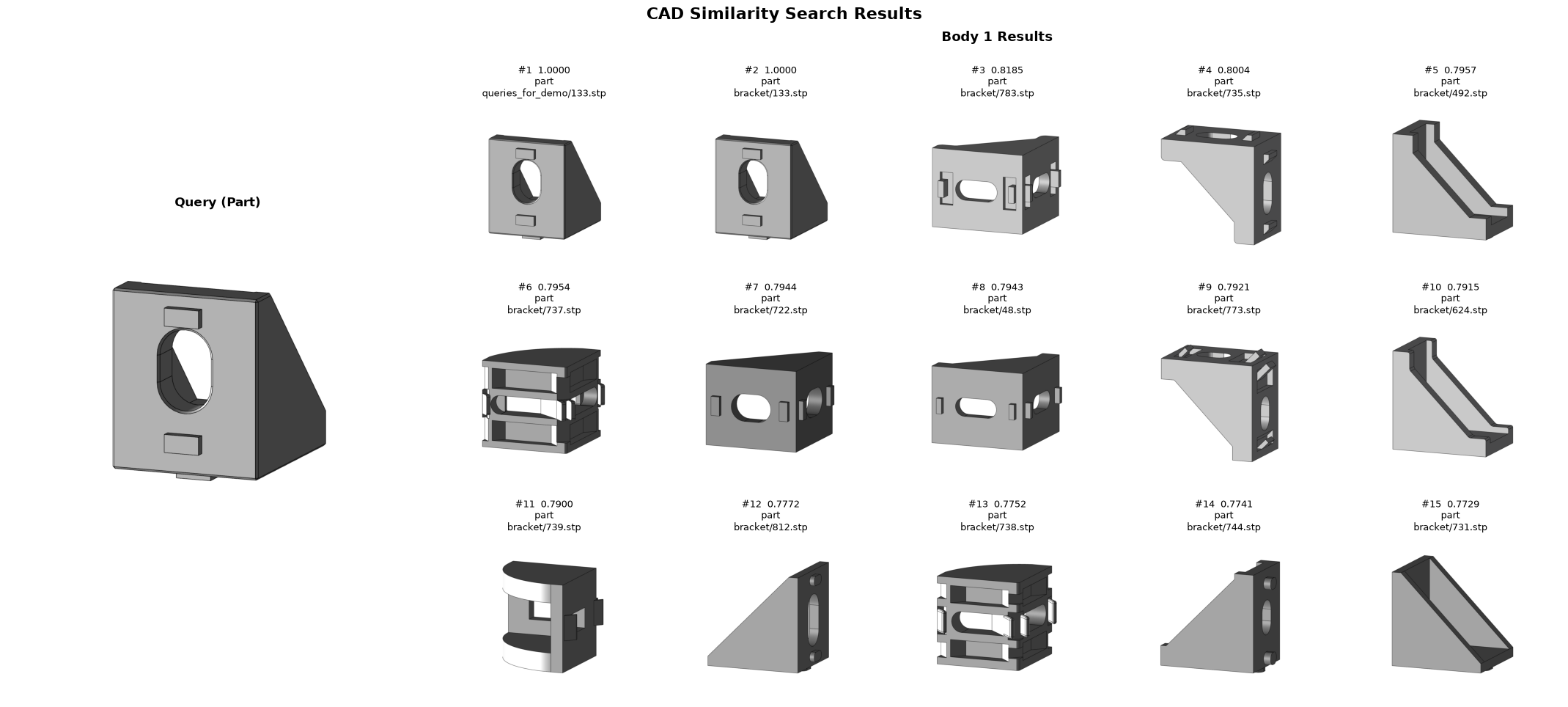
[14]:
metadata_by_id = context_provider.get_contexts([h.id for h in hits[part_index]])
hits_table(hits[part_index], metadata_by_id, keys=[CATEGORY_KEY])
[14]:
| id | score | Categories | |
|---|---|---|---|
| rank | |||
| 1 | C:\Users\LuisSalazar.LY-LS-LEGION\Documents\data\TMCAD_dataset_v2\queries_for_demo\133.stp | 1.00 | — |
| 2 | C:\Users\LuisSalazar.LY-LS-LEGION\Documents\data\TMCAD_dataset_v2\bracket\133.stp | 1.00 | ['Fastening', 'Housing', 'Structural'] |
| 3 | C:\Users\LuisSalazar.LY-LS-LEGION\Documents\data\TMCAD_dataset_v2\bracket\783.stp | 0.82 | ['Fastening', 'Housing', 'Rotational', 'Sealing'] |
| 4 | C:\Users\LuisSalazar.LY-LS-LEGION\Documents\data\TMCAD_dataset_v2\bracket\735.stp | 0.80 | ['Fastening', 'Housing', 'Rotational'] |
| 5 | C:\Users\LuisSalazar.LY-LS-LEGION\Documents\data\TMCAD_dataset_v2\bracket\492.stp | 0.80 | ['Fastening', 'Housing', 'Rotational'] |
| 6 | C:\Users\LuisSalazar.LY-LS-LEGION\Documents\data\TMCAD_dataset_v2\bracket\737.stp | 0.80 | ['Housing', 'Rotational'] |
| 7 | C:\Users\LuisSalazar.LY-LS-LEGION\Documents\data\TMCAD_dataset_v2\bracket\722.stp | 0.79 | ['Fastening', 'Housing', 'Rotational'] |
| 8 | C:\Users\LuisSalazar.LY-LS-LEGION\Documents\data\TMCAD_dataset_v2\bracket\48.stp | 0.79 | ['Fastening', 'Housing', 'Rotational'] |
| 9 | C:\Users\LuisSalazar.LY-LS-LEGION\Documents\data\TMCAD_dataset_v2\bracket\773.stp | 0.79 | ['Fastening', 'Housing', 'Rotational', 'Sealing'] |
| 10 | C:\Users\LuisSalazar.LY-LS-LEGION\Documents\data\TMCAD_dataset_v2\bracket\624.stp | 0.79 | — |
| 11 | C:\Users\LuisSalazar.LY-LS-LEGION\Documents\data\TMCAD_dataset_v2\bracket\739.stp | 0.79 | — |
| 12 | C:\Users\LuisSalazar.LY-LS-LEGION\Documents\data\TMCAD_dataset_v2\bracket\812.stp | 0.78 | ['Fastening', 'Housing', 'Mounting', 'Rotational'] |
| 13 | C:\Users\LuisSalazar.LY-LS-LEGION\Documents\data\TMCAD_dataset_v2\bracket\738.stp | 0.78 | ['Fastening', 'Housing', 'Rotational'] |
| 14 | C:\Users\LuisSalazar.LY-LS-LEGION\Documents\data\TMCAD_dataset_v2\bracket\744.stp | 0.77 | ['Fastening', 'Housing', 'Rotational'] |
| 15 | C:\Users\LuisSalazar.LY-LS-LEGION\Documents\data\TMCAD_dataset_v2\bracket\731.stp | 0.77 | ['Fastening', 'Housing', 'Rotational'] |
[15]:
predictions = predictor.infer(hits[part_index], keys=[CATEGORY_KEY])
predictions_table(predictions)
[15]:
| value | confidence | status | coverage | |
|---|---|---|---|---|
| key | ||||
| Categories | ['Housing', 'Fastening', 'Rotational'] | 87% | ready_to_propose | 12/15 |
Where to go from here
Plug in your own catalog. Replace
MultiLabelContextProviderwith aContextProvidersubclass backed by your PLM, ERP, or any metadata store; just return the list of categories per part fromget_contexts.Tune the rule. Adjust
threshold(precision vs. recall) andtemperature(how much the closest neighbours dominate the vote) onMultiLabelRule.Write your own rule.
MultiLabelRuleis a shortAggregationRulesubclass defined in this notebook — copy it as a starting point for any custom voting logic.Bake multi-label into a trained model. The retrieval approach above needs no training. To predict multiple labels directly from a trained classifier, swap its loss (cross-entropy → binary cross-entropy) and activation (softmax → sigmoid) while keeping the same extracting, encoding, and GCN architecture — see
`3e_workflow_for_HOOPS_EMBEDDINGS_fabwave.ipynb<../notebooks/3e_workflow_for_HOOPS_EMBEDDINGS_fabwave.ipynb>`__ for the training workflow.Full API reference: hoops_ai.ml.context_layer