In Settings > 3D Viewer settings, enable Show Measurement Information Panel.
Open your native 3D CAD file.
Select 3D Surface Note from the 3D toolbar.
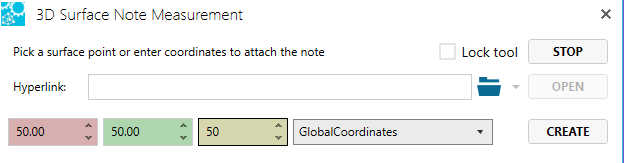
In the 3D Surface Note Measurement dialog window, fill in coordinates to place pick the surface point based on the selected coordinate system.
Click Create.
Click to place the note.
Enter note text with the Enter key to complete.
Note: It is possible to enter coordinates placing the note marker off any surfaces.
See also
Working with Notes
3D Notes
3D Viewer Settings
Conversation saved
SPINNY BETA
Hello! I'm SPINNY
Your multilingual generative AI assistant for documentation. Ask me anything about SpinFire Insight in your own language, or choose a sample question below to start a conversation:
What is SpinFire Insight?
What are the latest release notes for SpinFire Insight?
How do I start evaluating SpinFire Insight?
How can I get assistance?
SPINNY may store conversations according to OpenAI's policy. Responses may not always be accurate.