Preset Settings
SpinFire Insight 2025.3.0 onwards
Note When using the preset settings, any custom settings will be overidden and would have to be reapplied again afterwards, which will change the Performance Settings to “Custom” as a result.
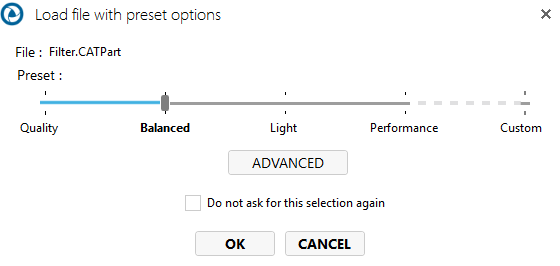
Quality - Maximum accuracy with slower loading
Balanced - Good performance with reasonable quality
Light - Fast performance with minimal quality
Performance - Maximum performance with lowest quality
Custom - User-defined settings that could be a mix of quality and performance settings
SpinFire Insight 2025.2.2 and versions before

Quality Settings
The following General and Importer settings change:
Tessellation level is set to high
Wireframe is turned on
Attributes turned on
Construction entities is turned on
Orientation Healing is turned on (STEP Format)
Detail Sheets is turned on
PMI is turned on
B-rep mode is turned on
Load Surfaces on Demand is turned off
Static Model Enabled is turned off
Prevent Thumbnail Creation is turned off
Balanced Settings
Tessellation level is medium
Wireframe is turned off
Attributes is turned off
Hidden Objects is turned off
PMI is turned off
B-rep mode is “Only tessellation”
Load Surfaces on demand is turned off
Static Model enabled is turned off
Prevent thumbnail creation is turned off.
Performance Settings
Tessellation level is set to low
Wireframe is set to off
Attributes is turned off
PMI is turned off
B-rep mode is set to “Only Tessellation”
Load Surfaces on Demand is on
Static Model is on
Prevent thumbnail creation is on