
User Guide
Using the Product
Default Translations
Default Translation – via the Unified Interface
The Unified Interface can be started via the Start Menu – if a shortcut was added during installation.
Alternatively, the Unified Interface can be run via a Windows Explorer selection in:
<UI_installation_directory>\bin\Unified_Interface.cmd
The following interface will be launched:
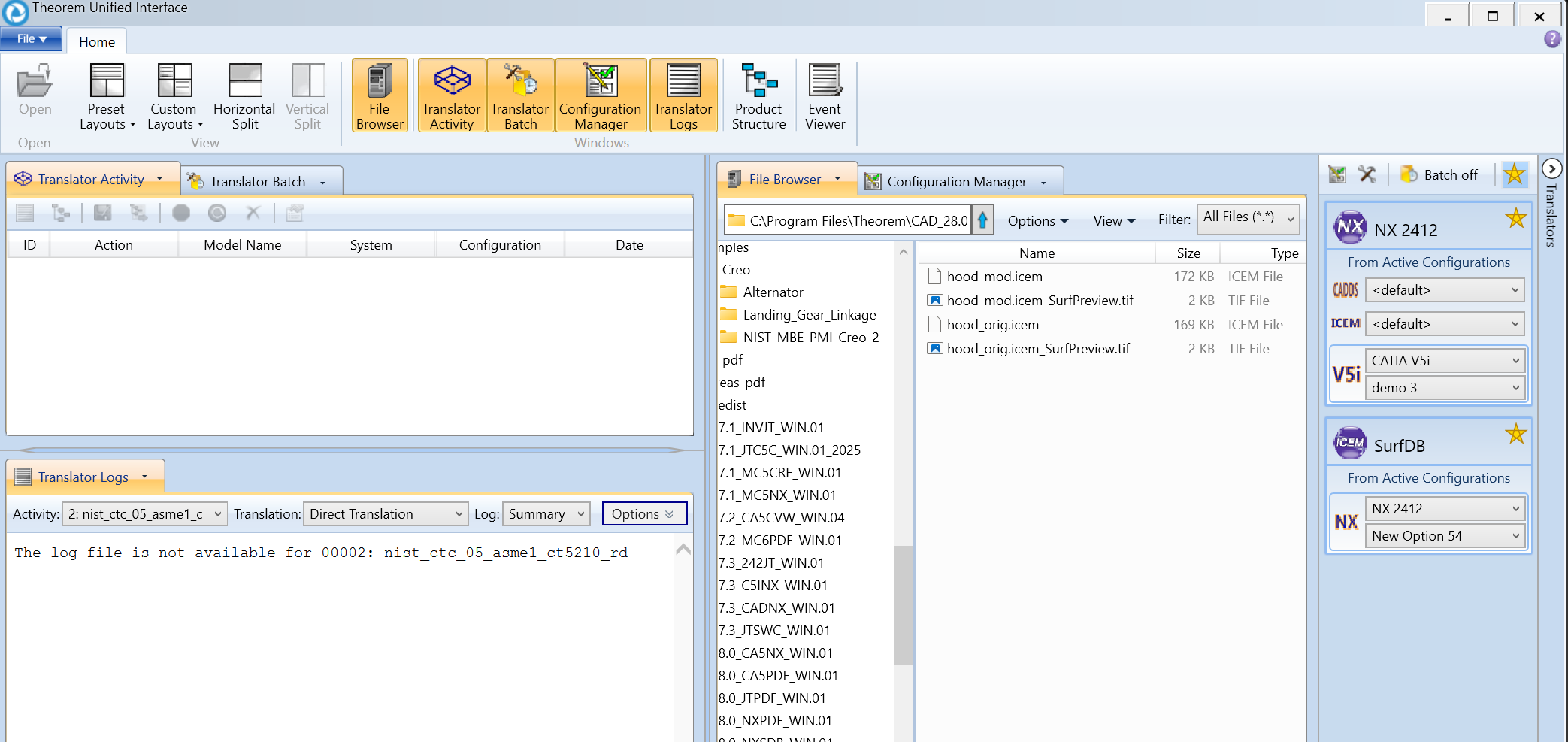
The default layout is split into 4 primary areas, which can be altered to the users preference:
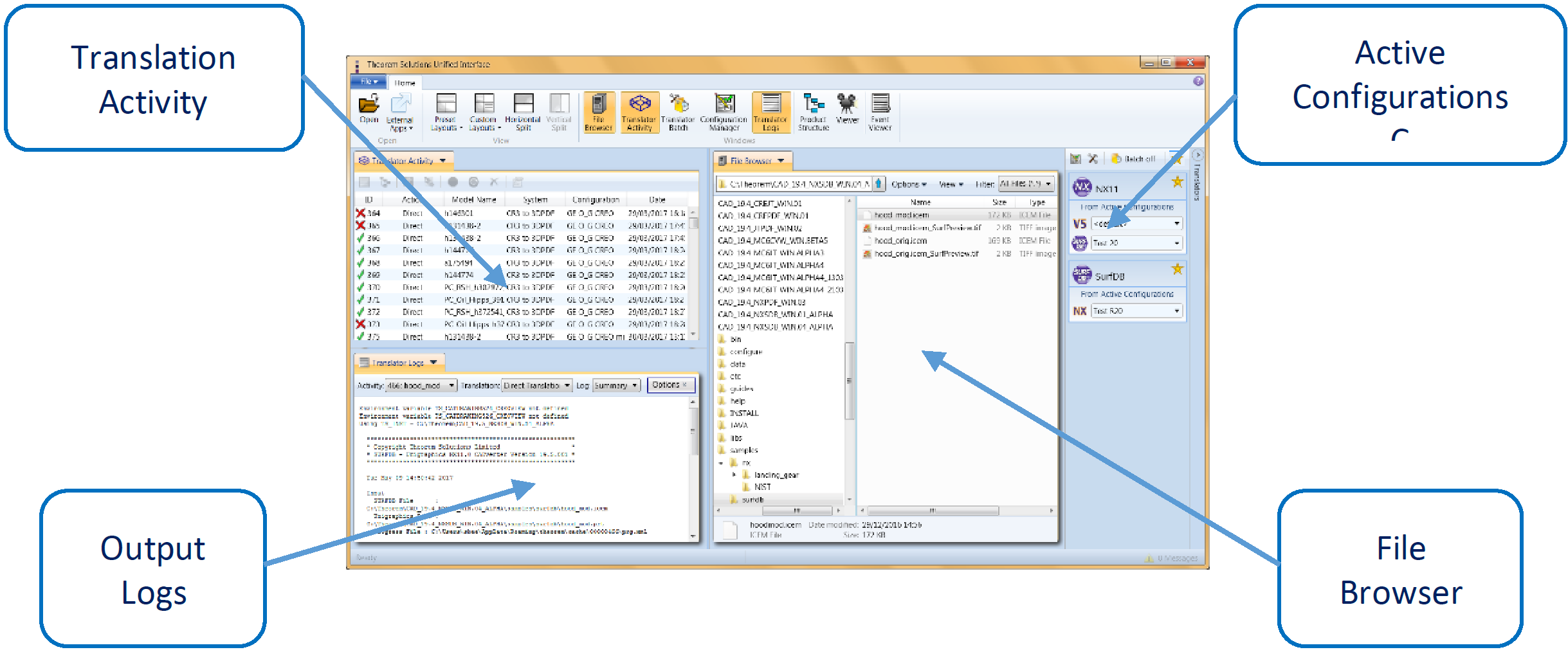
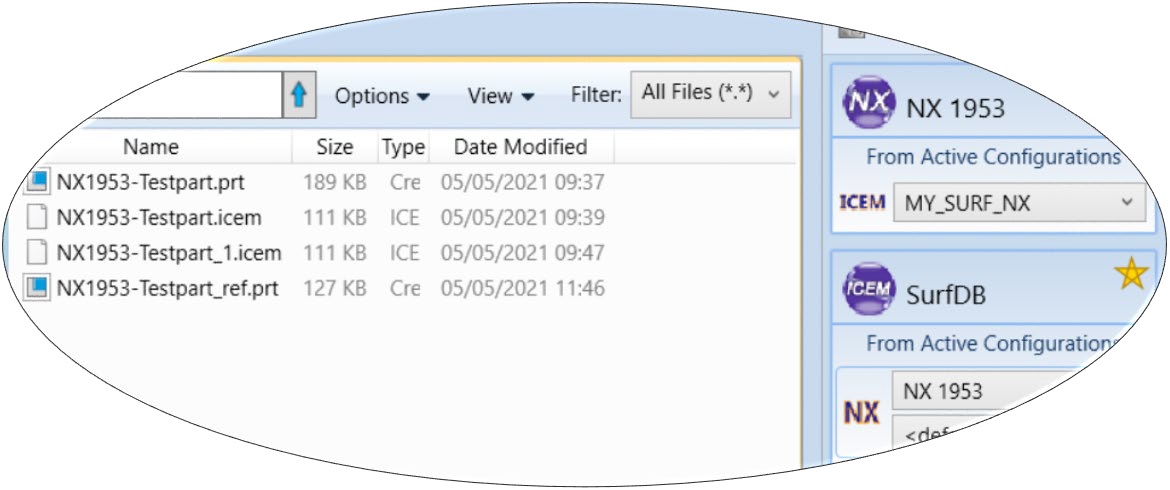
The simplest way to translate from Surf or NX is to drag a file from the file Browser Pane on to the Active Configurations for the translation you require.
On completion, the Unified Interface will display the activity information and details from the log file created during the translation, if requested, in the Translation Activity and Output Log panes, respectively.
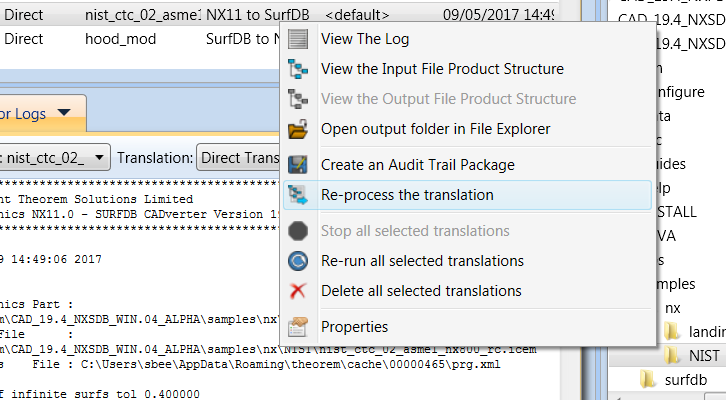
The generated output data can be located by selecting the translation from the Activity pane and opening the output folder. Other tasks such as Re-processing the translation are also possible from this menu:
Default Translation – via the Command Line
Running a translation via the command line can be carried out via the cad_run_UI.cmd file located in the <installation_directory>\bin directory. The format of the command is as follows when translating from Surf to NX:
<Translator_installation_directory>\bin\cad_run_UI.cmd SurfDB_NX[XX] -i <input_file> -o <output_file> -c "<configuration name>"
The format of the command is as follows when translating from NX to Surf:
<Translator_installation_directory>\bin\cad_run_UI.cmd SurfDB_NX[XX] -i <input_file> -o <output_file> -c "<configuration name>"
Where <configuration name> is the name of a Configuration e.g. “My SURF NX Config” (see below)
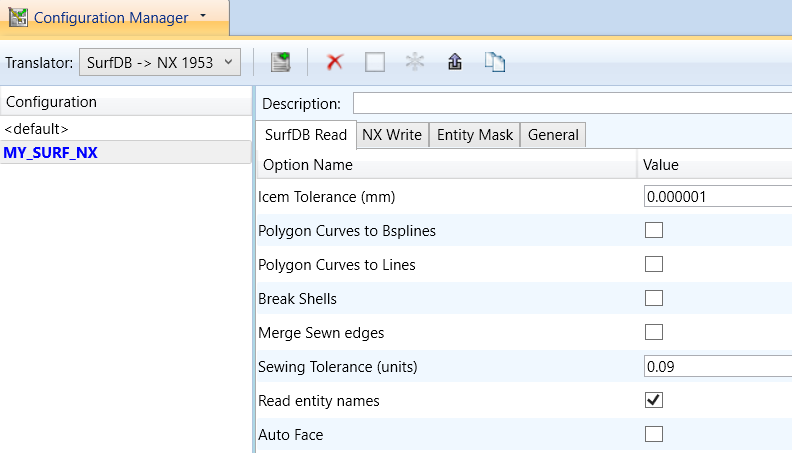
(Note! Replace the [XX] seen in the example with the version of NX that you are using. E.g. for NX 1953, change to SurfDB_NX1953):

The example above will translate a Surf sample file provided within the installation and produce the following screen output:
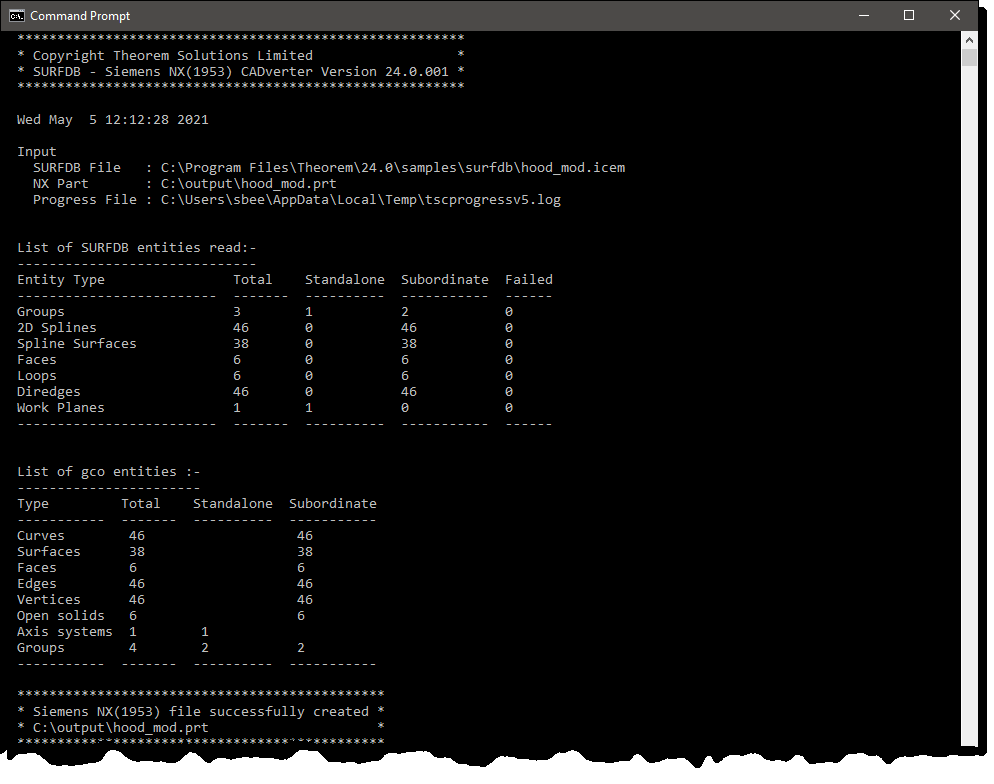
The file will be output to the target location. In this case:
C:\output\hood_mod.CATPart
CADverter Customization
CADverter allows the information that is read from the source system and written to the target system to be tailored via a set of user specified arguments. Commonly used arguments are supported via the Unified Interface, with Advanced Arguments being described within this document for use in the Unified Interface or via the Command Line invocation.
General Notes for Surf to NX
If the auto_face option is used then all standalone Spline Surfaces which are of Bezier type will automatically be faced.
2D edges which have discontinuities in them are split at each discontinuity when read. This means the number of edges for a face may increase.
Shells will be written as separate Faces if the break_shells option is used or the Shell sewing process fails.
A 2x2 surface will get converted to a plane, unless ‘no_plane_create’ is specified (see ‘Input Arguments’ below).
Conversion of the Polygon Curve is dependent upon whether the mc_to_bsp or mc_to_lin options have been used. If none of these options is used then Polygon Curves are ignored.
Common Options for Surf to NX
Within the Configuration Manager pane of the Unified Interface, arguments that can be specified when publishing Surf data into NX are grouped into 4 areas:
Surf Read – Those arguments that affect how data is read from Surf
NX Write – Those arguments that affect how the data is written to NX
Entity Mask – Those arguments that allow specific read entities to be masked
General – Those arguments that are common to ALL Publishing activities regardless of source data
Surf Read Arguments
The image below shows the Surf Read arguments that are available, with their default settings:
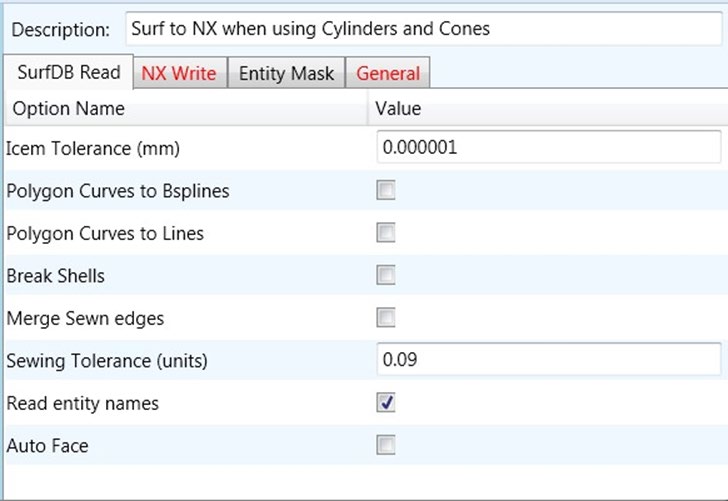
Each of these options is described below:
Option |
Description |
|---|---|
Icem Tolerance |
This tolerance is used in the translation when checking Face base surfaces for degeneracy and when fitting 3D edge curves. This can be altered with this option if required (Default is 0.000001m) Command Line Syntax:
|
Polygon Curves to Bsplines |
Converts polygon curves to b-splines. (Default is OFF). Command Line Syntax:
|
Polygon Curves to Lines |
Converts polygon curves to lines. (Default is OFF). Command Line Syntax:
|
Break Shells |
Any Shells encountered in the translation will be converted to UG Trimmed Surfaces (Solids). If this option is used then Shells will be broken into separate Faces. (Default is OFF). Command Line Syntax:
|
Merge Sewn Edges |
By default in surfdb_ug, whilst reading a Shell there will be no merging of edges performed during the sewing function. If merging is required, then the merge_sewn_edges option can be used. This will look for pairs of edges that join with sufficient degree of continuity, and are the only two edges that join at that point, and merge them into a single edge, thus simplifying the model. (Default is Off) Command Line Syntax:
|
Sewing Tolerance |
When a Shell is read it has to be sewn together (unless the break_shells option has been used). (Default is 0.09/units). Command Line Syntax:
|
Read Entity Names |
Reads the entity names from NX (Default is On) Command Line Syntax:
|
Auto Face |
This option specifies that standalone Bezier patches should be automatically faced. (Default is Off) Command Line Syntax:
|
NX Write Arguments
The image below shows the Write NX arguments that are available, with their default settings:
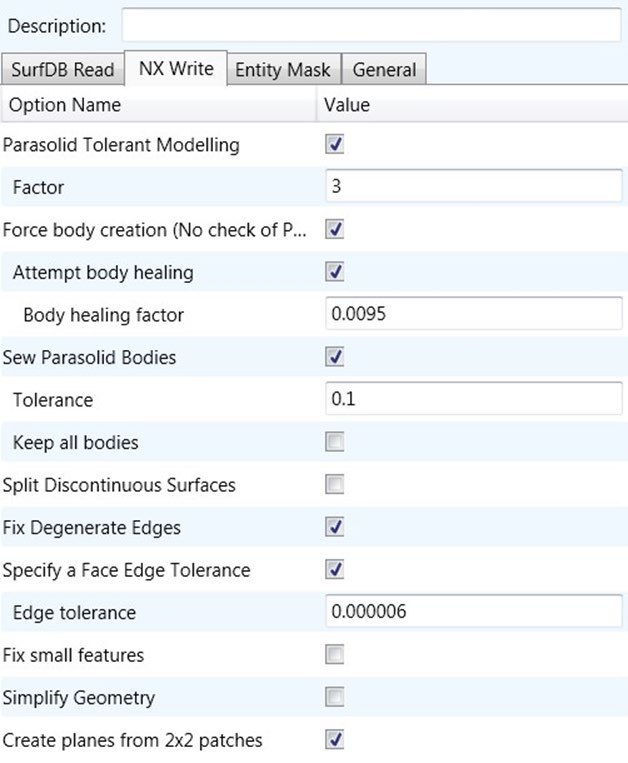
Each of these options is described below:
Option |
Description |
|---|---|
Parasolid Tolerant Modelling |
Enables Parasolid tolerant modelling. Default is ON. Command Line Syntax:
|
Factor |
A secondary option used with Parasolid Tolerant Modelling. Allows a factor to be defined. Default is 3. Command Line Syntax:
|
Force Body Creation |
Force the creation of bodies. Default is ON. Command Line Syntax:
|
Attempt body healing |
A secondary option used with Force Body Creation. Tries to heal the forced body. Default is ON. Command Line Syntax:
|
Body healing factor |
The factor to be applied to Attempt Body Healing. Default is 0.0095. Command Line Syntax:
|
Sew Parasolid Bodies |
Enabled Sewing of Parasolid Bodies. Default is ON. Command Line Syntax:
|
Tolerance |
A secondary option for Sew Parasolid Bodies giving the tolerance level to use. Default is 0.1. Command Line Syntax:
|
Keep all bodies |
A secondary option used with Sew Parasolid bodies allowing all bodies to be kept (no matter how small) that may be created as a result of sewing Default is OFF. Command Line Syntax:
|
Split Discontinuous Surfaces |
Split Discontinuous Surfaces. Default is ON. Command Line Syntax:
|
Fix Degenerative Edges |
On face create failure, check and fix any degenerate edges. Default is ON. Command Line Syntax:
|
Specify a Face Edge Tolerance |
Specify an edge tolerance to be used when creating faces. Default is ON. Command Line Syntax:
|
Edge Tolerance |
A secondary option used with Specify a Face Edge Tolerance where the tolerance value is assigned. Default is 0.000006. Command Line Syntax:
|
Fix small features in open solids |
Remove small edges, sliver and spike faces from open solids. Default is OFF. Command Line Syntax:
|
Simplify Geometry |
Simplify Geometry. Default is OFF. Command Line Syntax:
|
Create Planes from 2x2 patches |
A 2x2 surface is converted to a plane in UG. Note: A standalone surface with no face will only get converted to a plane if the ‘auto_face’ arg is also specified. Default is ON Command Line Syntax:
|
Surf to NX Entity Masking Arguments
The image below shows the Masking arguments that are available:
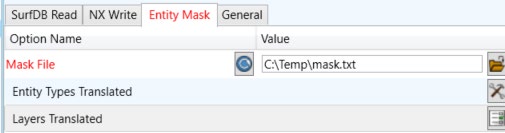
Each of these options is described below:
Option |
Description |
|---|---|
Mask File |
Specifies the Mask File to be written to, that can be referenced by future translations. A Mask file MUST be specified if masking is required. The first line in this file is OFF ALL ENT: Command Line Syntax:
|
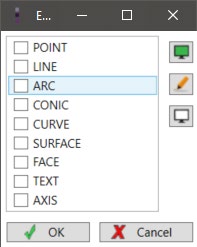
Entity Types Translated |
Specifies a selection list from which to select which entity types are to be processed. The corresponding types are available from the command line: “POI”, “LIN”, “ARC”, “CON”, “CUR”, “SUR”, “FAC”, “TEX”, “AXI” Command Line Syntax:
|
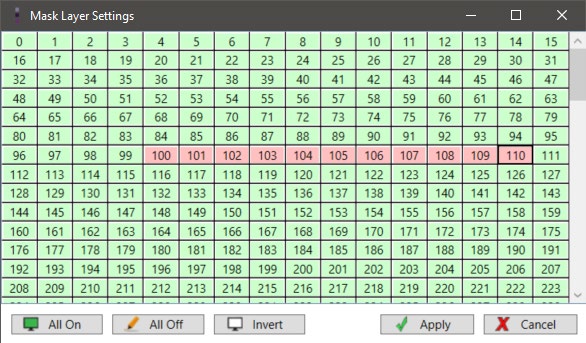
Layers Translated |
A selection list from which to select which layers are to be processed. Command Line Syntax:
|
Surf to V5 General Arguments
The image below shows the General arguments that are available, with their default settings:
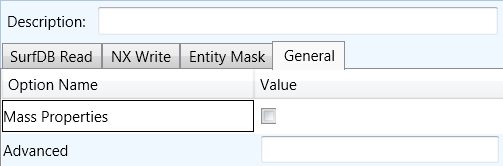
Each of these options is described below:
Option |
Description |
|---|---|
Advanced |
Allows any of the Command Line Advanced arguments documented below to be passed to the Unified Interface invocation |
ps_use2d |
This option tells UG to use the 2d curves supplied by SURFDB, rather than recreating them from the 3D edges curves (the default is OFF) Command Line Syntax:
|
General Notes for NX to Surf
3D edges for face that are Circular Arcs will be converted to 3D Splines.
Ellipses with hmaj/hmin >1000 are converted to 3D Splines due to loss of precision during conversion.
SURF does not support the Parabola or Hyperbola so they are converted to 3D Splines.
Planes that are base surfaces of Faces will be converted to Spline surfaces. Independent Planes are written (by default) to Work Planes in SURF, unless either of the the args [no_pln_to_wpln | pln_to_srf] is specified.
Since SURF does not support Solid Entities, any Solids encountered will be written to the SURF file as a collection of Faces, unless the no_break_breps option is used (see later).
If the bsp_to_mc option is used then degree 1 B-Splines are converted to Polygon Curves.
If there are only 2 points in the String then a Line is created, but, if more than 2 points then a Polygon Curve is created.
Common Options for NX to Surf
Within the Configuration Manager pane of the Unified Interface, arguments that can be specified when publishing Surf data into NX are grouped into 4 areas:
NX Read – Those arguments that affect how data is read from NX
Surf Write – Those arguments that affect how the data is written to Surf
Entity Mask – Those arguments that allow specific read entities to be masked
General – Those arguments that are common to ALL Publishing activities regardless of source data
NX Read Arguments
The image below shows the NX Read arguments that are available, with their default settings:
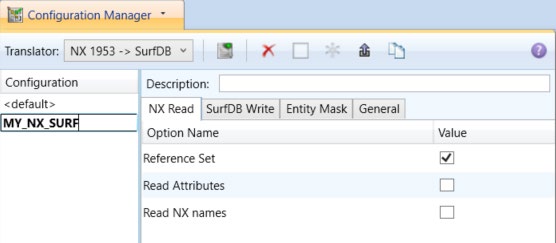
Each of these options is described below.
Option |
Description |
|---|---|
Reference Set |
Enabled reference set processing. Default is ON Command Line Syntax:
|
Read NX Attributes |
Read NX user attributes. Default is OFF. Command Line Syntax:
|
Read NX names |
Read NX entity names, if they exist. Default is OFF. Command Line Syntax:
|
Surf Write Arguments
The image below shows the Surf Write arguments that are available, with their default settings:
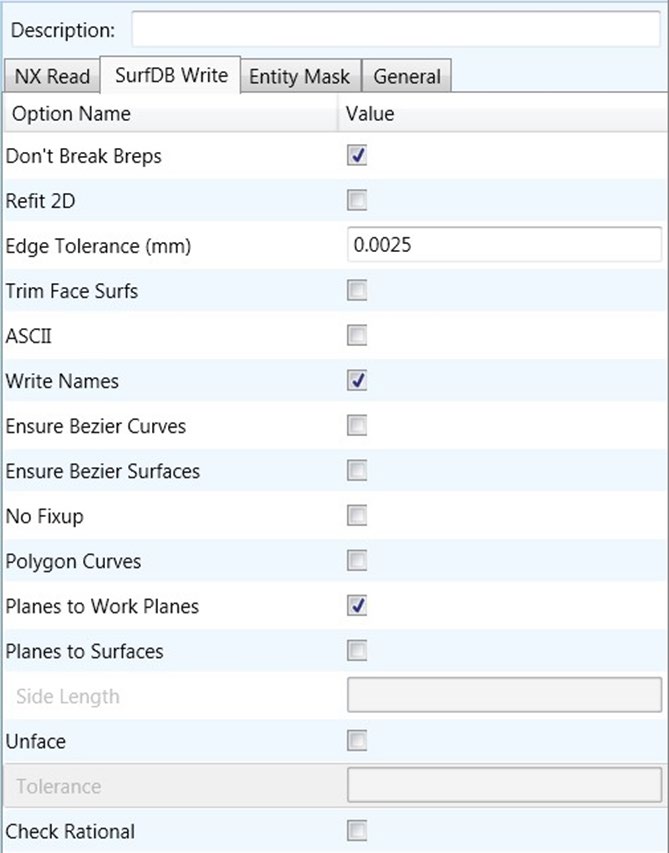
Each of these options is described below:
Option |
Description |
|---|---|
Break Breps |
By default, Brep Solids (as opposed to Open Solids) will be broken down into their constituent Faces during conversion. By using the no_break_breps option, Brep Solids will be converted to Shell entities. If the Brep has voids then each void will be converted to a Shell entity and the resulting Shells will become members of a Group entity which will be given the name of the originating Brep (unless no_write_names has been used or the Brep has no name). The outermost shell of the Brep will be the first member of the Group. Default is ON. Command Line Syntax:
|
Refit 2D |
Optional. Specifies that faces read from NX should not have their 2D parametric edges refitted before being written to SURF but as far as possible, should be kept as they are from NX. This argument also increases the speed of processing because the translator does not have to perform the refitting process. If this option is not used then Face edges will be checked to see if splitting is required and whether the parametric loops are closed correctly. Default is OFF. Command Line Syntax:
|
Edge Tolerance (mm) |
There are 4 conditions for which 2D edge curves will be refitted for a particular Face during translation:
Default is 0.0025. Command Line Syntax:
|
Trim Face Surfaces |
Faces can be based on surfaces that are significantly larger than the face requires. By default, the translator will leave such surfaces as they are (which can lead to tolerance and extent problems in the receiving system). By using the trim_face_surfs option only the portion of the surface which is required by the Face will be translated thus reducing the amount of data stored and also reducing the risk of tolerance and extent problems in the receiving system. Default is OFF. Command Line Syntax:
|
Ascii |
By default, a binary output file will be created. With the use of this option an ascii output file will be created. Default is OFF. Command Line Syntax:
|
Write Entity Names |
By default, each entity will be written to the output file with its name (if it has one). If the no_write_names option is used then all entities will be given an automatically generated name. Default is ON. Command Line Syntax:
|
Ensure Bezier Curves |
All spline curves that are single segment will be checked to ensure that they are in Bezier form, if possible. Default is OFF. Command Line Syntax:
|
Ensure Bezier Surfaces |
All single patch surfaces will be checked to ensure that they are in Bezier form, if possible. Default is OFF. Command Line Syntax:
|
No Fixup |
This option specifies that the check for effectively zero length parametric segments in B-Spline Curves should NOT be performed. If the option is not used then by default the check IS performed and any segments encountered which are too short are removed. Default is ON. Command Line Syntax:
|
Polygon Curves |
This option will check for degree 1 B-Spline curves that are not part of a Face and convert them to Polygon Curves. The default is to convert such curves to BSplines in the normal way. Default is OFF. Command Line Syntax:
|
Planes to Work Planes |
Independent Planes are written to Work Planes in SURF. Default is ON. Command Line Syntax:
|
Planes to Surfaces |
By default, the translator will convert free planes in NX to Work planes in SURF unless the argument ‘no_pln_to_wpln’ is specified, in which case they are ignored. If turned on, then Bsurfs will be created. Default is OFF. Command Line Syntax:
|
Side Length (mm) |
Related to pln_to_srf. Default is 1. Command Line Syntax:
|
Unface |
Trims the surface back to the face boundary, if the value set is in the tolerance of the surface isoparms. Default is OFF. Command Line Syntax:
|
Unface Tolerance (mm) |
Related to unface. Default is 0.00001. Command Line Syntax:
|
Check Rational |
Check to ensure incoming surfaces are rational. NOTE this can take will take a longer time to process if switched on. Default is OFF. Command Line Syntax:
|
NX to Surf Entity Masking Arguments
The image below shows the Masking arguments that are available, with their default settings:
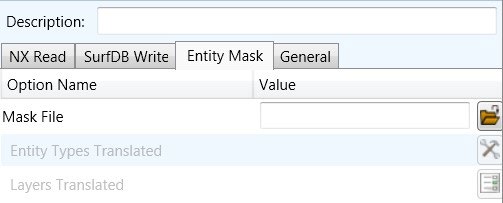
Each of these options is described below:
Option |
Description |
|---|---|
Mask File |
Specifies the Mask File to be written to, that can be referenced by future translations. A Mask file MUST be specified if masking is required. The first line in this file is OFF ALL ENT: Command Line Syntax:
|
Entity Types Translated |
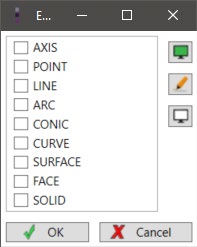
Specifies a selection list from which to select which NX entity types are to be processed. The following types are available: “AXI”,”POI”,”LIN”,”ARC”,”CON”,”CUR”,”SUR”,”FAC”,”SOL” Command Line Syntax:
|
Layers Translated |
Specifies a selection list from which to select which layers are to be processed. Command Line Syntax:
|
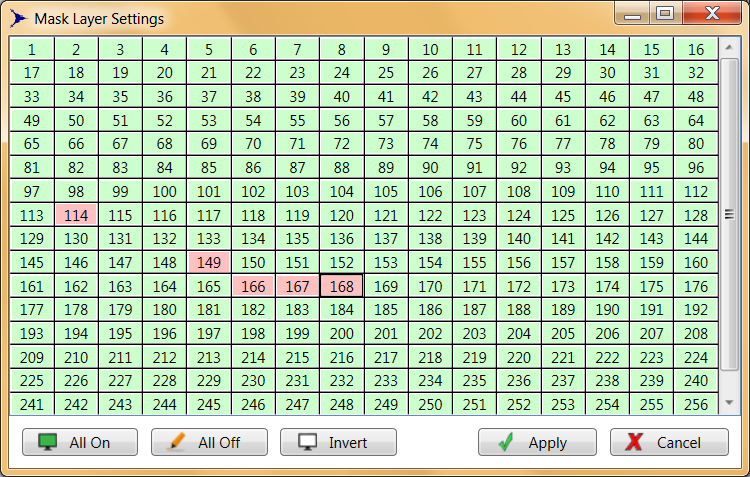
NX to Surf General Arguments
The image below shows the General arguments that are available, with their default settings:
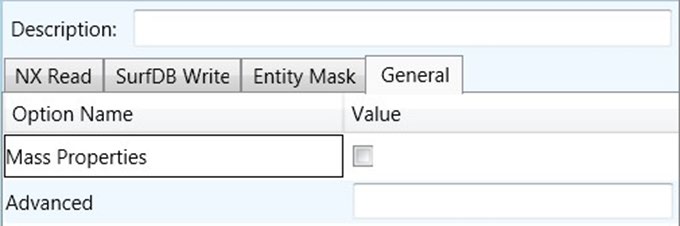
The option is described below:
Option |
Description |
|---|---|
Advanced |
Allows any of the Command Line Advanced arguments to be passed to the conversion process |
Command Line Advanced Arguments
Any of the advanced arguments can be added to the Command Line Invocation or to the General->Advanced field when run from within the User Interface.
Surf Advanced Arguments
Argument |
Description |
|---|---|
convert_curves |
Converts curves to NURBS form. (Default is OFF). Command Line Syntax:
|
convert_surfaces |
Converts surfaces to NURBS form. (Default is OFF). Command Line Syntax:
|
face_opacity |
Reads face opacity. This can lead to a performance degradation. (Default is OFF). Command Line Syntax:
Allows definition of tolerance below which an entity is considered to be totally transparent. |
Translating Interactively from within Surf
The Surf to NX translator allows an active Surf Part or Assembly to be exported directly into NX format or an NX Part or assembly to be imported directly from within the Surf application.
In order to translate from within Surf, the Surf application must be started.
The appropriate KDdat files must be modified to set the environment up to successfully create good quality data depending on the translator use. The modification of these files is explained later in this document in JT Configuration File – Configuring Surf
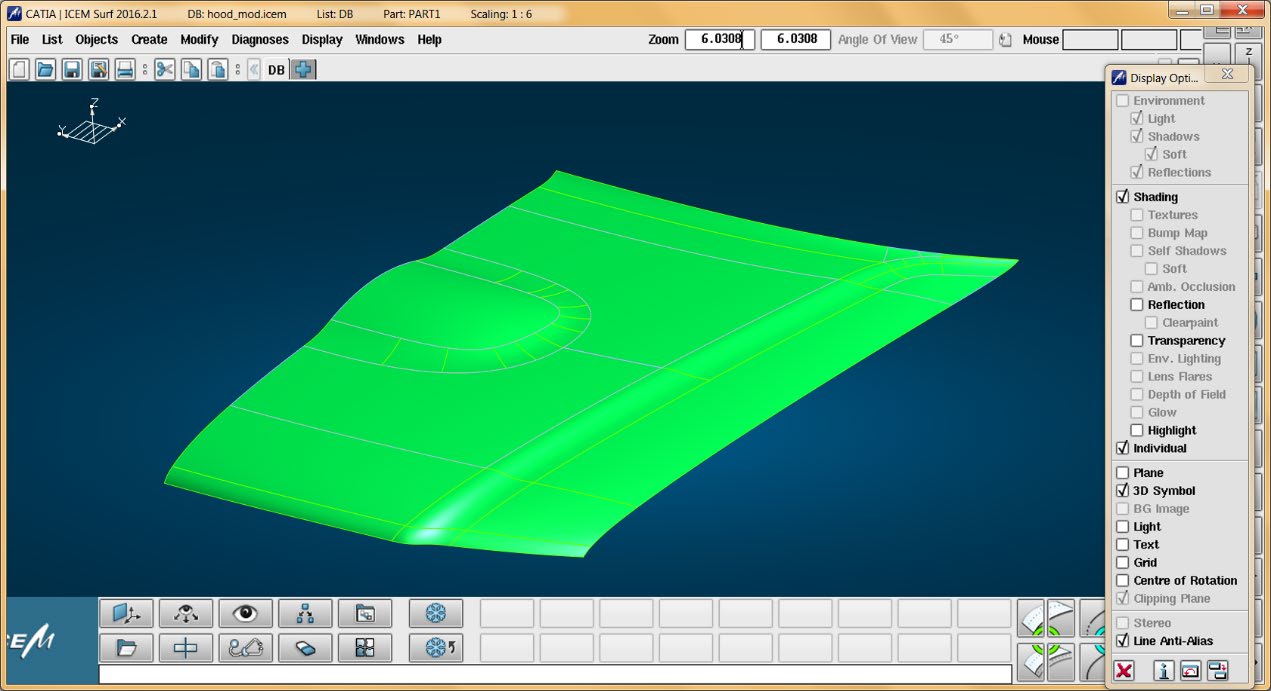
Surf can then be started using the standard commands e.g.
Export
Once Surf has been started and a model loaded, the active Part or Assembly can be exported to NX.
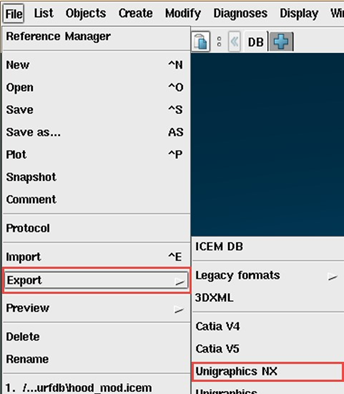
In order to export, the user selects the File -> Export Menu Option:
Which in turn launches the Export panel:
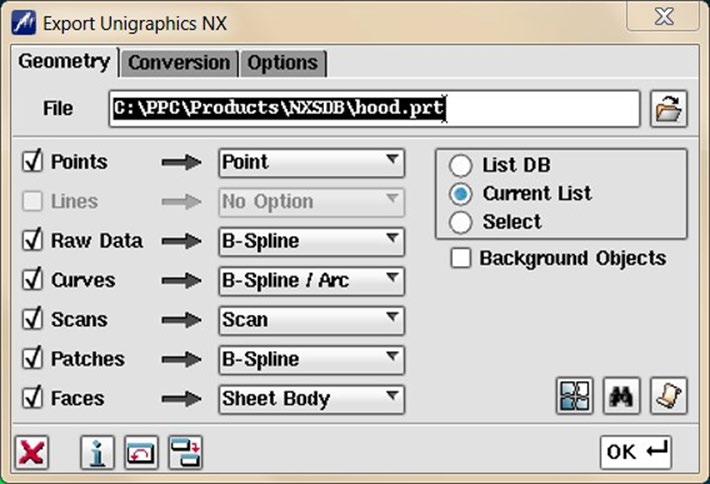
The File field may be prepopulated. However, this can be modified prior to selecting the OK button.
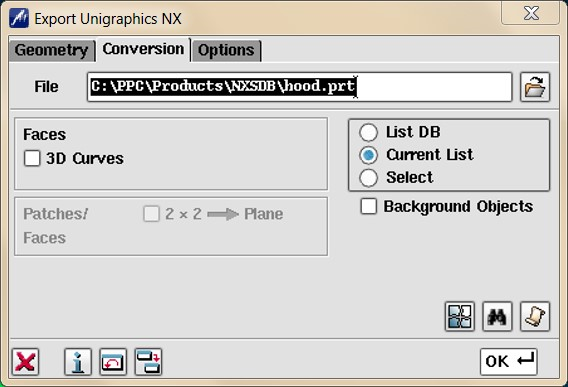
The Conversion and Options tab are shown below, for further information please refer to the relevant section of the ICEM Surf documentation.
The Options tab
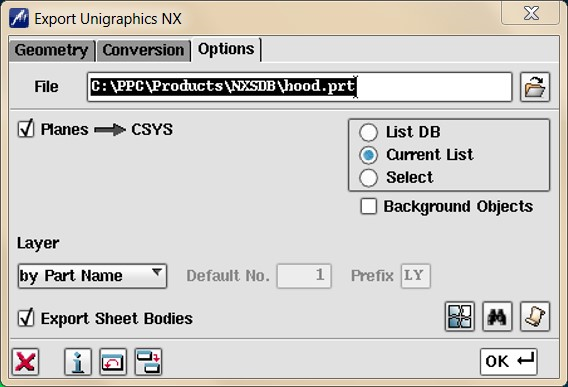
On selecting OK the on the Export Panel, the active Part or Assembly will be written to NX using the selected output directory.
Import
Once Surf has been started, NX data can be imported into Surf.
In order to import, the user selects the File -> Import Option:
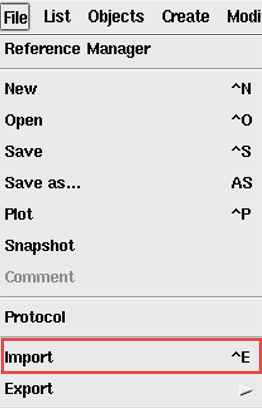
Which in turn launches the Import File Browser panel:
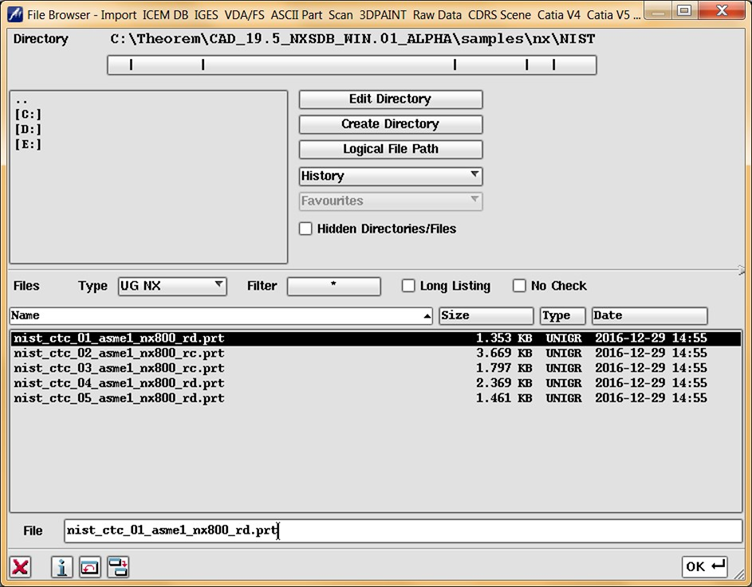
The Import From option allows the user to select the NX part or assembly to import.
Selecting the OK button, brings up the Import dialog.
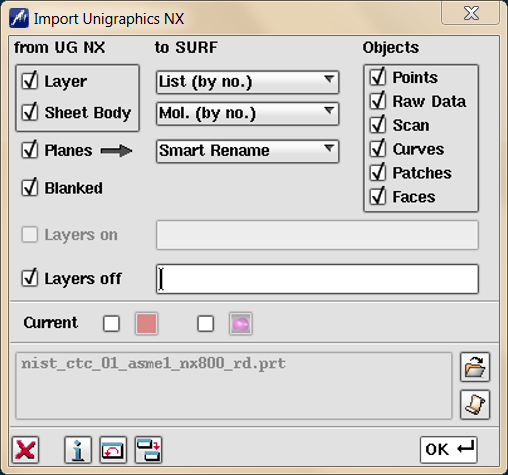
Selecting OK the on the Import Panel import NX data will be imported into Surf and the data saved using the input into the selected output directory. For more information please refer to the relevant section of the ICEM Surf documentation.
Surf Configuration
Introduction
For the Surf product to successfully import/export data with a Theorem product it is necessary for the system administrator to make some modifications to directive files within the Surf product. These files are named…
kddat_to_ug_directive.txt
ug_to_kddat_directive.txt
For a default Surf 20XX installation their location is in
C:\Program Files\Dassault Systemes\ICEM Surf\icemsurf-20XX.Y\win_b64\reffiles
The partial contents of the ug_to_kddat_directive.txt file are shown below
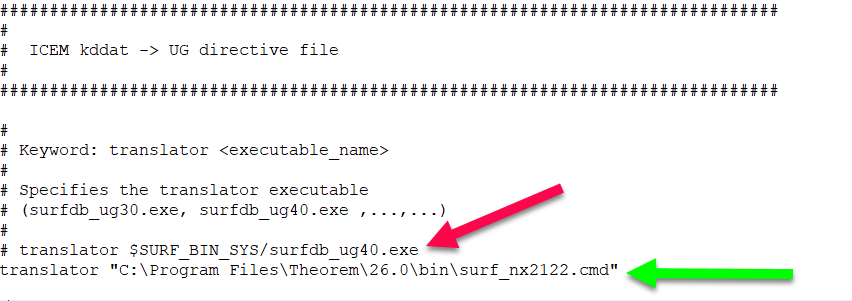
In the above diagram the supplied reference to NX 4.0 should be removed or commented out and the appropriate line for NX2122 added.
NOTE: If there is a space in the path name e.g. Program Files then the whole path should be quoted “” as shown
A similar change is needed to the kddat_to_ug_directive.txt to enable the converter to point to the correct export translator e.g enter the line similar to that below.
C:\Program Files\Theorem\26.0\bin\surf_nx2212.cmd
At this revision there are two available methods with to which call the translation. The first is a new way of working which allows the user to specify a named config defined by the Configuration Manager within the UI as detailed earlier in the document. The advantage of this method is that the config, or its contents, can be changed without the need to close ICEM.
The older method is still supported at this revision for those customers that wish to continue using this.
The two scripts which control the launching of the theorem translator when importing NX data.
%TS_INST%\bin\nx[XXX]_surf.cmd – New Method%TS_INST%\bin\ug[XXX]_surfdb.cmd – Old MethodSimilarly for exporting data to NX
%TS_INST%\bin\surf_nx[XXX].cmd – New Method%TS_INST%\bin\surfdb_ug[XXX].cmd – Old MethodAs all these scripts source the Theorem environment which includes the NX ROOT DIR they are used directly in the definition within the directive files.
If using the new method, it is also necessary to supply the name of the config files to be used with the cmd files.
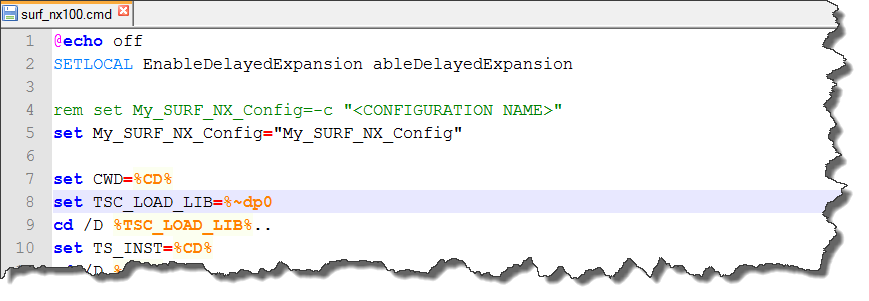
The configs can be created by the method shown earlier in this document.
Default Values
The original products were written to support the premise that Surface Design data would be written into NX for final detailing. It was also seen to be important that these surfaces should not change, if possible, to keep the original design intent.
Current design practices of using scanned data or convergent modelling means that the data often starts off in the CAD system and passed to Surf to create the surface required.
If the surface then needs to be detailed, it may then need to be passed back to the CAD system. In an iterative Design process, this return trip may happen several times.
Because of the different modelling philosophies between CAD and Surface design, and exact and tolerant modelling techniques, a number of compromises may have to be made between success and accuracy during the translation.
There are four sets of recommended defaults to suit the different design practices used. Please note that each customers data may differ in its requirements for translation, so the defaults used are advisory only. Further examples will be added to a download area as they become available.
Surf → NX (single trip)
The default arguments are set for this option, i.e. a specific config file is not necessary
NX → Surf (single trip)
The default arguments are set for this option, i.e. a specific config file is not necessary
Surf → NX (when using cones and cylinders in Surf)
Data may need to be prepared to give an acceptable output in NX.
no_brep_prep |
NX write arg – don’t prepare body |
icem_tol 0.000001 |
SurfDB read arg used to set geometric read tolerance |
surf_tol 0.0000001 |
NX write arg used to set surface and edge tol used |
face_edge_tol 0.0000001 |
NX write arg to set edge tol |
ps_use2d |
use 2D curves if they exist |
NX → Surf (for NX parts using tolerant edges)
These arguments are suggested for use to maintain accuracy when converting NX parts which have been modelled with tolerant edges.
noprep |
NX read arg – don’t prepare body |
surf_tol 0.0000001 |
NX read arg used to set surface and edge tolerance used in read |
edge_tol 0.000001 |
SurfDB write arg used to specify edge tolerance used in Surf |
Sample Configs
A zip file containing some sample configurations can be found here. To use them they should be placed in the area where your existing config are stored. In a default installation for a single user this will be in
C:\Users\MyUserName\AppData\Roaming\theorem\configure
For more information on how to make these available for all users see the section ‘Common Configurations’ in the UI User guide (UI_Doc.pdf)
Three new configs have been added at 22.2 which should cover most eventualities:
If data is from Surf and translates to NX with missing faces, then try config ‘SDBNX_prepare’
If translated data has edge tolerances that are worse than the source data, use the appropriate ‘*_tight_tolerances’ config.
Further Examples
For printing a config file argument contents
The Configuration files are of xml format. If you want a list of the contents in text form, then the following command can be used.
C:\Program Files\Theorem22.2\CAD_22.2_NXSDB_WIN.01\bin\cad_run.cmd -a "My NX SURF Config" -o C:\temp\contents.txt
For running CAD_RUN with a config
C:\Theorem\CAD_19.5_NXSDB_WIN.01_ALPHA\bin\cad_run.cmd NX11_SurfDB -c "NXSDB"
-i C:\Theorem\CAD_19.5_NXSDB_WIN.01_ALPHA\samples\nx\NIST\nist_ctc_01_asme1_nx800_rd.prt -o C:\Theorem\CAD_19.5_NXSDB_WIN.01_ALPHA\samples\nx\NIST\nist_ctc_01_asme1_nx800_rd_out.icem
Using Defaults
"C:\Program Files\Theorem 22.2\bin\cad_run.cmd" NX11_SurfDB -i "C:\PPC\Tests\R20 Tests_020617\ErrorExample2.prt" -o "C:\PPC\Tests\R20 Tests_020617\ErrorExample2.icem

