
User Guide
Using the Product
Default Translations
Default Translation - via the Unified Interface
The Unified Interface can be started via the Start Menu - if a shortcut was added during installation.
Alternatively, the Unified Interface can be run via a Windows Explorer selection in:
<UI_installation_directory>\bin\Unified_Interface.cmd
The following interface will be launched:
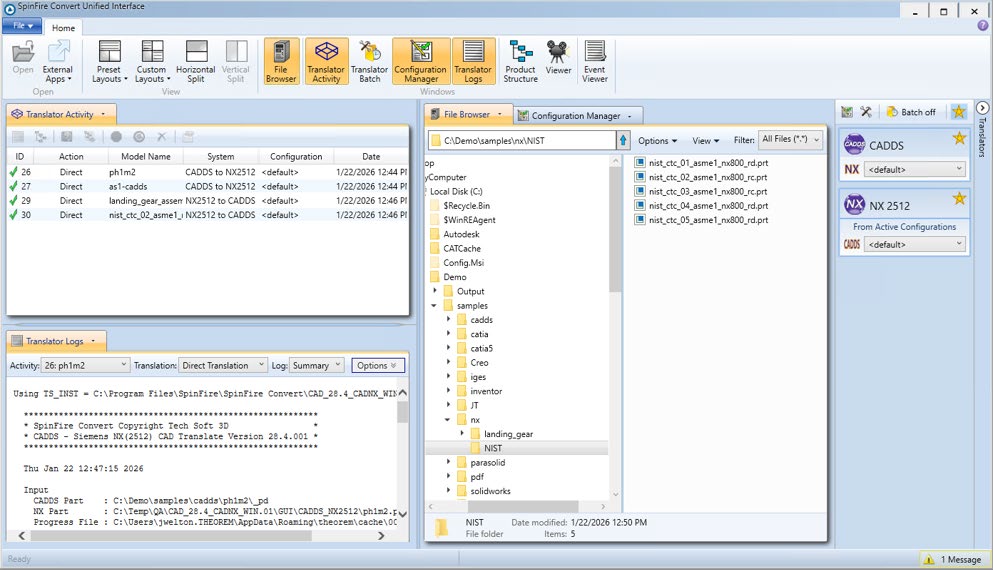
The default layout is split into 4 primary areas, which can be altered to the user’s preference. The simplest way to translate from CADDS or NX is to drag a file from the File Browser Pane on to the Active Configurations for the translation you require.
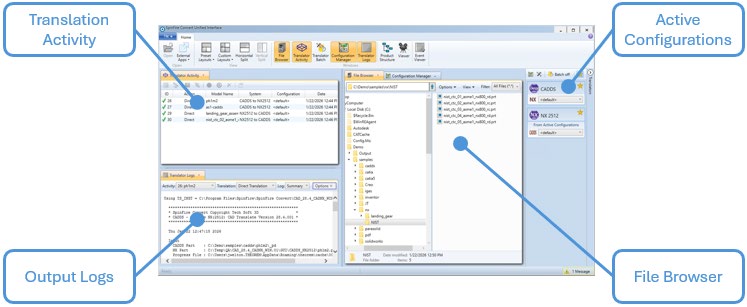
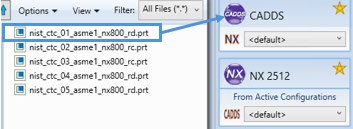
On completion, the Unified Interface will display the activity information and details from the log file created during the translation, if requested, in the Translation Activity and Output Log panes, respectively.
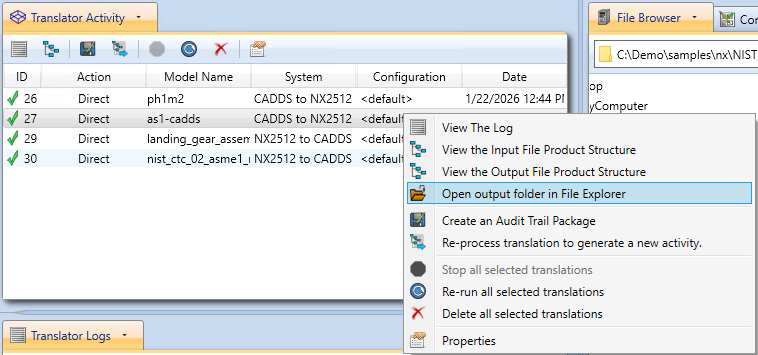
The generated output data can be located by selecting the translation from the Activity pane and opening the output folder:
Default Translation via the Command Line
Running a translation via the command line can be carried out via the cad_run.cmd file located in
the <installation_directory>\bin directory.
CADDS to NX:
<Translator_installation_directory>\bin\cad_run.cmd CADDS_NX2512 -i <input_file> -o <output_file> progress_file "<Path_to_progress_log\.txt>"
NX to CADDS:
<Translator_installation_directory>\bin\cad_run.cmd NX2512_CADDS -i <input_file> -o <output_file> search_path "<parts_dir1>";"<Parts_dir2>" progress_file "<Path_to_progress_log\.txt>"
Translator Customization
SpinFire Convert allows the information that is read from the source system and written to the target system to be tailored via a set of user specified arguments. Commonly used arguments are supported via the Unified Interface, with Advanced Arguments being described within this document for use in the Unified Interface or via the Command Line invocation.
Common Options for CADDS to NX
Within the Configuration Manager pane of the Unified Interface, arguments that can be specified when publishing CADDS data into NX are grouped into 4 areas:
CADDS Read - Those arguments that affect how data is read from CADDS
NX Write - Those arguments that affect how the data is written to NX
Entity Mask - Those arguments that allow specific read entities to be masked
General - Those arguments that are common to ALL Publishing activities regardless of source data
CADDS Read Arguments
The image below shows the CADDS Read arguments that are available, with their default settings:
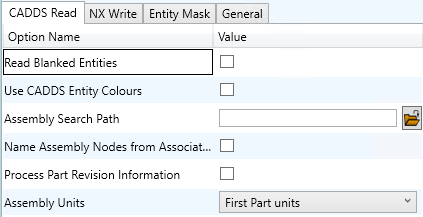
Each of these options is described below:
Option |
Description |
|---|---|
Read Blanked Entities |
Read Blanked Entities/Files (Default is off). Command Line Syntax: |
Use CADDS Entity Colours |
Use CADDS Entity Colours instead of Part colours (Default is off). Command Line Syntax: |
Assembly Search Path |
Defines the locations of assembly components. Command Line Syntax: |
Name Assembly Nodes from Associated Geometry File |
Name Assembly Nodes from Associated Geometry File. Command Line Syntax: |
Process Part Revision Information |
For assemblies only (Default is off). Command Line Syntax: |
Assembly Units |
Specify the Units when reading an assembly (Default setting will use first part units). Command Line Syntax: |
NX Write Arguments
The image below shows the Write NX arguments that are available, with their default settings:
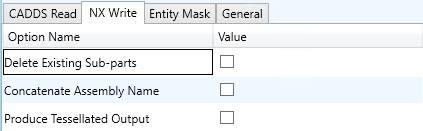
Each of these options is described below:
Option |
Description |
|---|---|
Delete Existing Sub-parts |
Delete existing sub-parts. Command Line Syntax: |
Concatenate Assembly Name |
Concatenate Assembly Name TO Output Filename. Command Line Syntax: |
Produce Tessellated Output |
Produce Tessellated NX file. Command Line Syntax: |
CADDS - NX Entity Masking Arguments
The image below shows the Masking arguments that are available, with their default settings:
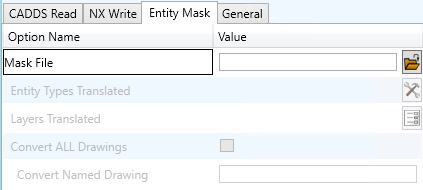
Each of these options is described below:
Option |
Description |
|---|---|
Mask File |
Specifies the Mask File to be written to, that can be referenced by future translations. A Mask file MUST be specified if masking is required. The first line in this file is OFF ALL ENT. Command Line Syntax: |
Entity Types Translated |
Specifies a selection list from which to select which entity types are to be processed. The following types are available: POI, LIN, ARC, CON, CUR, SUR, FAC, SOL. Mask File Syntax: Add any of the above to the specified mask file, one entry
per line prefixed by the word ON, e.g. |
Layers Translated |
Select layers to translate. Mask File Syntax: A single entry of |
Convert ALL Drawings |
Convert All Drawings. Command Line Syntax: |
Convert Named Drawing |
Convert Drawing by Name. Mask File Syntax: |
CADDS - NX General Arguments
The image below shows the General arguments that are available, with their default settings:
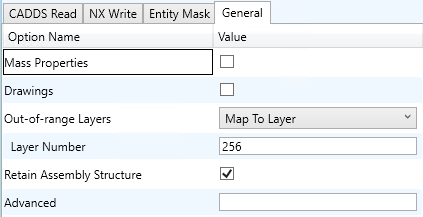
Each of these options is described below:
Option |
Description |
|---|---|
Mass Properties |
Allows Mass Property information to be read from the source data and written as attributes (Default is OFF). Command Line Syntax: |
Drawings |
Translate All Drawings (Default is off). Command Line Syntax: |
Out-of-range Layers |
Maintain the assembly structure during translation (Default is ON). Command Line Syntax: |
Retain Assembly Structure |
Maintain the assembly structure during translation (Default is ON). Command Line Syntax: |
Advanced |
Allows any of the Command Line Advanced arguments documented to be passed to the Unified Interface invocation. |
Common Options for NX to CADDS
Within the Configuration Manager pane of the Unified Interface, arguments that can be specified when publishing NX data into CADDS are grouped into 4 areas:
NX Read - Those arguments that affect how data is read from NX
CADDS Write - Those arguments that affect how the data is written to CADDS
Entity Mask - Those arguments that allow specific read entities to be masked
General - Those arguments that are common to ALL Publishing activities regardless of source data
NX Read Arguments
The image below shows the NX Read arguments that are available, with their default settings:
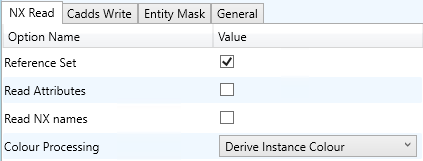
Each of these options is described below:
Option |
Description |
|---|---|
Reference Set |
Enabled reference set processing. Command Line Syntax: |
Read Attributes |
Read NX detail user attributes. Command Line Syntax: |
Read NX names |
Read NX entity names, if they exist. Command Line Syntax: |
Colour Processing |
How to process colour. Command Line Syntax: |
CADDS Write Arguments
The image below shows the CADDS Write arguments that are available, with their default settings:
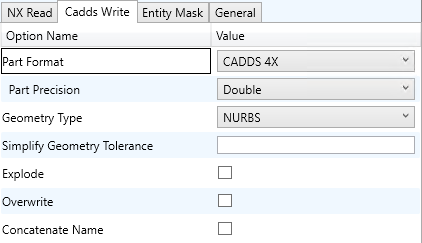
Each of these options is described below:
Option |
Description |
|---|---|
Part Format |
Specifies the format of the output (Default is CADDS 4X). Command Line Syntax: |
Part Precision |
Specifies the precision when writing CADDS 4 format (Default is Double). Command Line Syntax: |
Geometry Type |
Defines the geometry type (Default is NURBS). Command Line Syntax: |
Simplify Geometry Tolerance |
Simplify the geometry (e.g. 0.001 in input part units). Command Line Syntax: |
Explode |
Explode Solids to Faces (Default is off). Command Line Syntax: |
Overwrite |
Overwrite Existing Parts. Command Line Syntax: |
Concatenate Name |
Concatenate Assembly Name. Command Line Syntax: |
NX - CADDS Entity Masking Arguments
The image below shows the Masking arguments that are available, with their default settings:
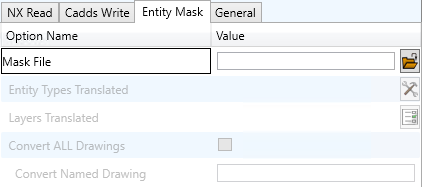
Each of these options is described below:
Option |
Description |
|---|---|
Mask File |
Specifies the Mask File to be written to, that can be referenced by future translations. A Mask file MUST be specified if masking is required. The first line in this file is OFF ALL ENT. Command Line Syntax: |
Entity Types Translated |
Specifies a selection list from which to select which entity types are to be processed. The following types are available: POI, LIN, ARC, CON, CUR, SUR, FAC, SOL. Mask File Syntax: Add any of the above to the specified mask file, one entry
per line prefixed by the word ON, e.g. |
Layers Translated |
Select layers to translate. Mask File Syntax: A single entry of |
Convert ALL Drawings |
Convert All Drawings. Command Line Syntax: |
Convert Named Drawing |
Convert Drawing by Name. Mask File Syntax: |
NX - CADDS General Arguments
The image below shows the General arguments that are available, with their default settings:
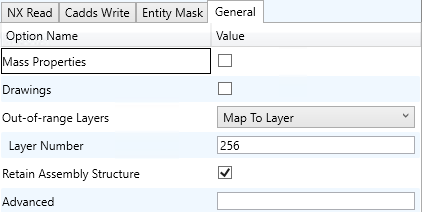
Each of these options is described below:
Option |
Description |
|---|---|
Mass Properties |
Allows Mass Property information to be read from the source data and written as attributes (Default is OFF). Command Line Syntax: |
Drawings |
Translate All Drawings (Default is off). Command Line Syntax: |
Out-of-range Layers |
Maintain the assembly structure during translation (Default is ON). Command Line Syntax: |
Retain Assembly Structure |
Maintain the assembly structure during translation (Default is ON). Command Line Syntax: |
Advanced |
Allows any of the Command Line Advanced arguments documented to be passed to the Unified Interface invocation. |
CADDS to NX Arguments List
CADDS Read Arguments
Each of these options is described below.
Option |
Description |
|---|---|
Maintain Blanked Entities |
Read blanked entities and maintain their show/hide state. Default is OFF. Command Line Syntax: |
Use CADDS Entity Colours |
Use CADDS entity colours rather than part colours. Command Line Syntax: |
Assembly Search Path |
Specify the search paths that contain assembly parts. Command Line Syntax: Or |
Name Assembly Nodes from Associated Geometry File |
Default is OFF. Command Line Syntax: |
Process Part Revision Information |
Read assembly revision info from _ps file. Command Line Syntax: |
Assembly Units |
Specify the units when reading an assembly. Command Line Syntax: |
NX Write Arguments
CMD Line Option |
Purpose |
Data Type |
Default |
|---|---|---|---|
|
For GCO Fsolids produce Facetted bodies (else attempt brep) |
Flag |
off |
|
Attempt a UG heal on the created body (if nocheck on). Default tolerance = 0.0095/units |
Flag |
off |
|
If input solid gets created as a solid after sewing, plus one or more tiny sheet bodies, keep or delete these |
Flag |
on (keep all) |
|
Don’t check created Parasolid geometric entities |
Flag |
off |
|
Prepare solids switched off |
Flag |
on (surfs read as nurbs+prep) |
|
Enable Parasolid tolerant modeling. Default num = 3 |
Flag |
on |
|
Sew failed breps and opensols |
Flag |
on |
|
Prepare CSG Primitives. Default tolerance = 0.000001*scale |
Flag |
off |
|
Change CSG Shift Distance. Default tolerance = 0.000001*scale |
Flag |
off |
|
Fix CSG Primitives |
Flag |
off |
|
Remove small edges, sliver and spike faces in breps |
Flag |
off |
|
Remove small edges, sliver and spike faces in opensolids |
Flag |
off |
NX to CADDS Advanced Arguments
NX Read Arguments
CMD Line Option |
Purpose |
Data Type |
Default |
|---|---|---|---|
|
Read UG entity names (if they exist) |
Flag |
off |
|
Process As Saved part layers, else All |
Flag |
ALL |
|
Read PMI as stroked data |
Flag |
off |
|
Prepare solids switched off / on |
Flag |
on (surfs read as nurbs+prep) |
|
Read native edge curves |
Flag |
off (read as nurbs curves) |
|
Trim surface to face |
Flag |
off (don’t trim) |
|
Switch on validate read to progress file |
Flag |
off |
|
Switch on read diagnostics to progress file |
Flag |
off |
|
No Parasolid merging of entities |
Flag |
on (merge) |
|
Check Parasolid entities before read |
Flag |
off (don’t check) |
|
Read Mass Props |
Flag |
off |
|
Process 2D drawings |
Flag |
off |

