CATIA V5 > 3D PDF v29.2
History
Revision |
Update Information |
|---|---|
1.0 |
Initial document release for Version 29.2 |
Product Codes
Product Code |
Product Description |
|---|---|
CA5PDF-U1 |
CADPublish Enhance for CATIA V5 |
CA5PDF-I2 |
CADPublish Create for CATIA V5 |
CA5PDF-S1 |
Publish 3D consultancy services add-on module to support export of CATIA V5 Motion data to PDF |
Supported Application Revisions
The following application revisions have been qualified with this release.
Application |
Revision |
|---|---|
CATIA V4 |
All revisions |
CATIA V5 |
CATIA V5-6R2020, CATIA V5-6R2021, CATIA V5-6R2022, CATIA V5-6R2023, CATIA V5-6R2024, CATIA V5-6R2025, CATIA V5-6R2026 |
Adobe Reader |
Adobe Reader 7.0 and above |
Supported Operating Systems
The following operating systems have been qualified with this release.
Operating System |
Qualification Status |
|---|---|
Windows 10 |
Fully Supported |
Windows 11 |
Fully Supported |
Installation Process Considerations
Starting with version 20.0 of Theorem Solutions applications changes have been made to the installation process. These changes have transitioned from a JAVA based installer package to a standard Microsoft Installer (.msi) package. A current limitation of the Microsoft msi method is that the software cannot be installed directly on to either externally mapped or network drives when installed from a client machine:
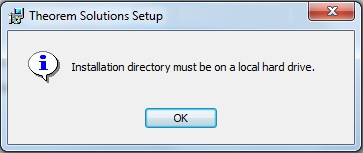
Therefore, the installation must be performed to a drive that is local to the machine itself.
If you are attempting to install the software onto a network drive, then please refer to the configuration guide available from the following link:
http://www.theorem.com/documentation/Documentation/Client_Configuration.pdf.
Distribution Media
CD images of the latest release are available from the following download site. The installation media for the bi-directional product is also the same media when installing a uni-directional variant.
Product Codes |
Select link to download CD images |
|---|---|
All Product Codes for all supported versions of CATIA V5 |
|
SpinFire Unified Interface |
|
Theorem License Manager |
New Features / Enhancements
The following new features or enhancements have been introduced with this release.
CatiaV5 3dpdf
Ref ID |
New Feature / Enhancement Description |
|---|---|
1 |
Added support for CATIA V5-6R2026 |
Known Limitations and Restrictions
The following limitations and restrictions have been identified prior to release.
CA53DPDF
Ref ID |
Limitations and Restrictions |
|---|---|
1 |
General
Ref ID |
Limitations and Restrictions |
Resolved Support Calls
The following list of Support Calls are resolved with this release.
Support Call ID |
Brief Description |
|---|---|
TH-2295 |
Sketches/Lines Missing from View in PDF Output: Two sketch lines referenced in the capture were missing from the generated 3D PDF when using the output_mbd_leaf_nodes option. This issue is resolved in version 29.2. |
TH-2299 |
Points Removed from the PDF View: Points disappeared when users interacted with the generated PDF, such as changing the render mode to Illustrated or selecting a component from the parts list. This issue is resolved in version 29.2. |
TH-2330 |
Points Disappearing When Geometry Is Selected: Points displayed in the “Hole Locations” view disappeared when a point, the model geometry, or a component in the parts list was selected. This issue is resolved in version 29.2. |
TH-1014 |
Multiple issues affected geometry and PMI visibility in captures, including incorrect geometry, problems with output_mbd_leaf_nodes and inst_pmi, missing PMI in the No_Parts view, and a translation error on a specific dataset. This issue is resolved in version 29.2. |