
User Guide
Using the Product
Default Translations
Default Translation – via the Unified Interface
The Unified Interface can be started via the Start Menu – if a shortcut was added during installation.
<UI_installation_directory>\bin\Unified_Interface.cmd
The following interface will be launched:
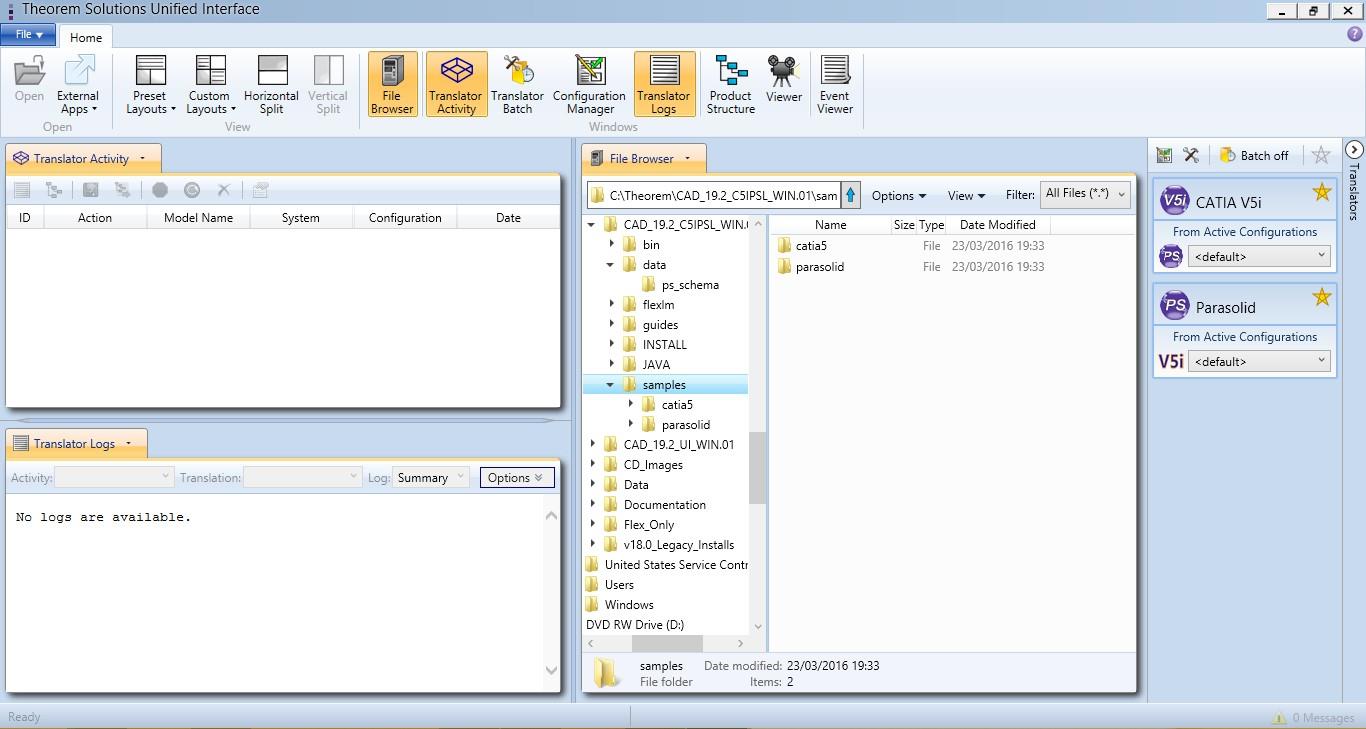
The default layout is split into 4 primary areas, which can be altered to the user’s preference.
Note – When activated the configuration manager will appear as a tab next to the output logs.
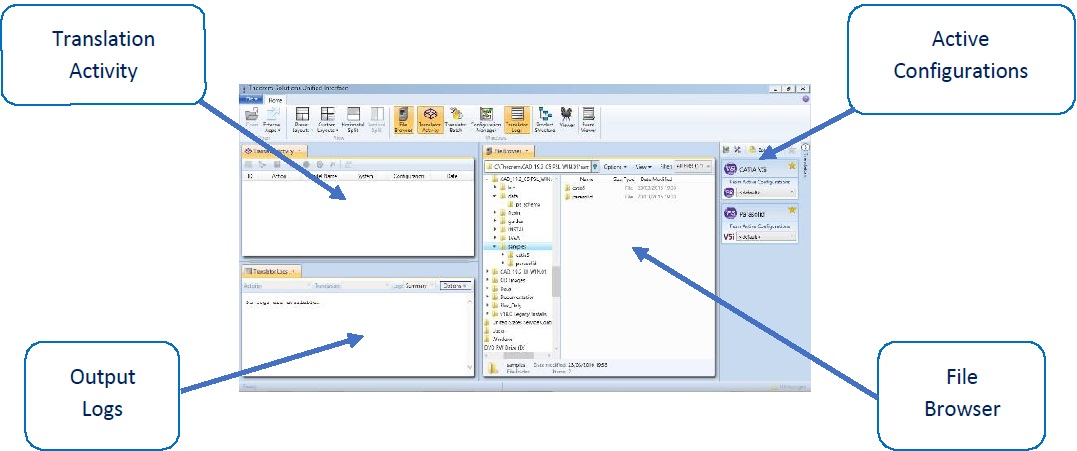
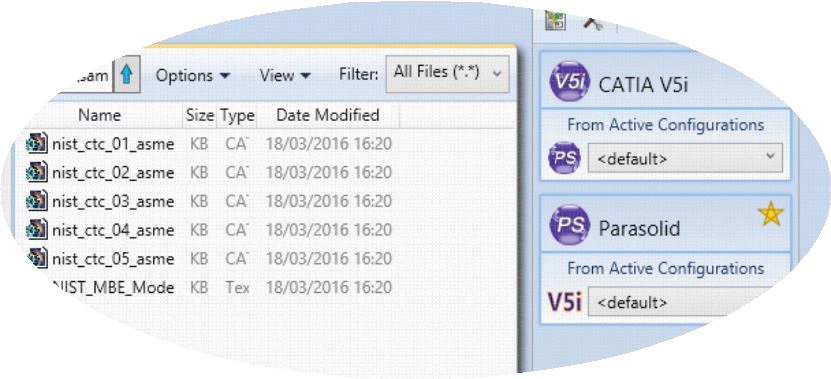
The simplest way to translate from CATIA V5 to PARASOLID is to drag a file from the file Browser Pane on to the Active Configurations for the translation you require.
On completion, the Unified Interface will display the activity information and details from the log file created during the translation, if requested, in the Translation Activity and Output Log panes, respectively.
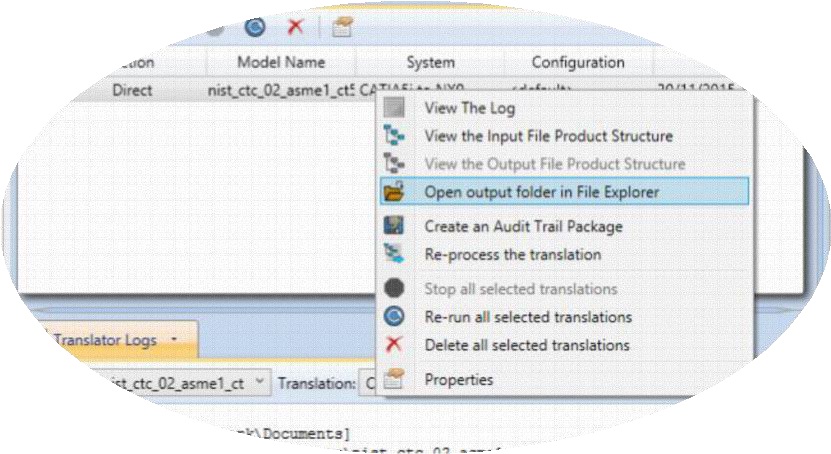
The generated output data can be located by selecting the translation from the Activity pane and opening the output folder:
Default Translation – via the Command Line
Running a translation via the command line can be carried out via the cad_run.cmd file located in the <installation_directory>\bin directory. The format of the command is as follows when translating from CATIA V5i to PARASOLID:
<Translator_installation_directory>\bin\cad_run.cmd Catia5i_Parasolid -i <input_file> -o <output_file>

The example above will translate a CATIA V5 sample file provided within the installation and produce the following screen output:
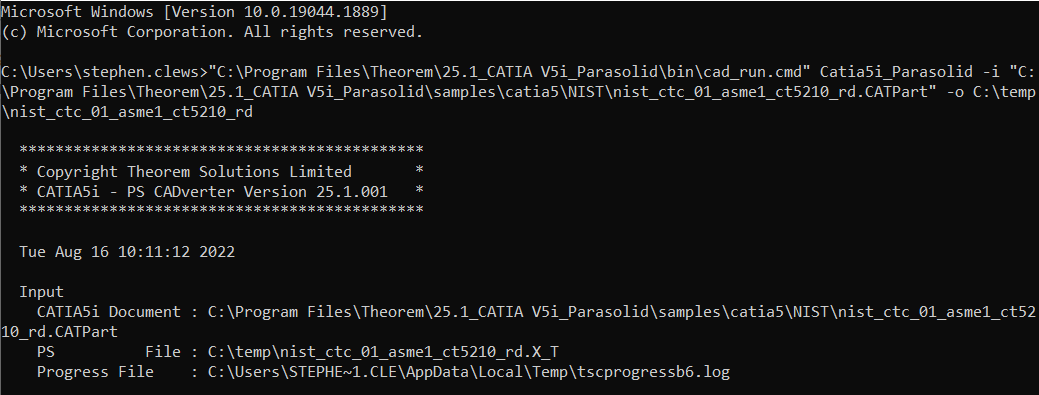
The file will be output to the target location. In this case:
C:\Temp\nist_ctc_02_asme1_ct5210_rd.X_T
The format of the command is as follows when translating from PARASOLID to CATIA V5i:
<Translator_installation_directory>\bin\cad_run.cmd Parasolid_Catia5i -i <input_file> -o <output_file>
Translator Customization
The Theorem translator allows the information that is read from the source system and written to the target system to be tailored via a set of user specified arguments. Commonly used arguments are supported via the Unified Interface, with Advanced Arguments being described within this document for use in the Unified Interface or via the Command Line invocation.
Common Options for CATIA V5i to Parasolid
Within the Configuration Manager pane of the Unified Interface, arguments that can be specified when publishing CATIA V5 data into Parasolid are grouped into the following areas:
CATIA V5i Read – Those arguments that affect how data is read from CATIA V5.
Parasolid Write – Those arguments that affect how the data is written to Parasolid.
Entity Mask – Those arguments that allow specific read entities to be masked.
General – Those arguments that are common to ALL Publishing activities regardless of source data.
CATIA V5i Read Arguments
The image below shows the CATIA V5i Read arguments that are available, with their default settings:
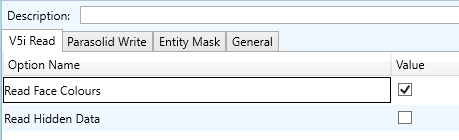
Each of these options is described below:
Option |
Description |
|---|---|
Retain Assembly Structure |
Retain the assembly structure. Default is ON. Command Line Syntax
|
Read Face Colours |
Process face colours in preference to body colours. Default is ON. Command Line Syntax
|
Parasolid Write Arguments
The image below shows the PARASOLID Write arguments that are available, with their default settings:
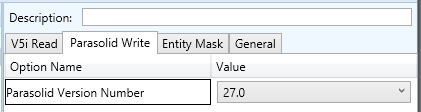
Each of these options is described below:
Option |
Description |
|---|---|
Parasolid Version Number |
Parasolid version number to ‘Save As’ (default latest - 35) Command Line Syntax
|
CATIA V5i to Parasolid Entity Masking Arguments
The image below shows the CATIA V5i to Parasolid Entity Mask arguments that are available, with their default settings:
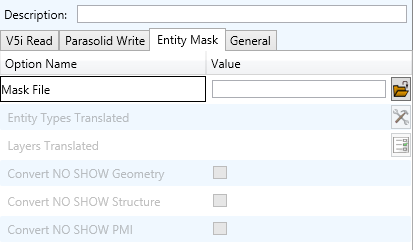
Each of these options is described below:
Option |
Description |
|---|---|
Mask File |
Specifies the Mask File to be written to, that can be referenced by future translations. A Mask file MUST be specified if masking is required. The first line in this file is OFF ALL ENT: Command Line Syntax:
|
Entity Types Translated |
Specifies a selection list from which to select which entity types are to be processed. The following types are available: “SOL” - Masks any 3D entity
“SKIN” - Masks any 2D entity
“CUR” - Masks any 1D entity
“POI” - Masks any 0D entity
“AXIS” - Masks Axis Systems
“ISOL” - Masks Isolated facetted solids
“CCRV” - If on creates a CCRV curve for wire frame edges that have more than one supporting curve
“TEXT” - Masks PMI Text
Command Line Syntax: Add any of the above to the specified mask file, one entry per line prefixed by the word ON, e.g.: ON POI to ensure they are considered in the translation. |
Layers Translated |
Specifies a selection list from which to select which layers are to be processed. Command Line Syntax: A single entry of ON ALL LAY Must precede any Layer Mask command. Add a list or range of numbers representing layer to be processed to the specified mask file to ensure they are NOT considered in the translation. e.g.: OFF LAY 114,149,166,167,168 |
Convert NO SHOW Geometry |
Enables Hidden geometry to be processed (Default is Off) Command Line Syntax:
|
Convert NO SHOW Structure |
Enables Hidden Assembly Structure to be processed (Default is Off) Command Line Syntax:
|
Convert NO SHOW PMI |
Enables Hidden PMI to be processed (Default = Off) Command Line Syntax:
|
CATIA V5i to Parasolid General Arguments
The image below shows the General arguments that are available, with their default settings:
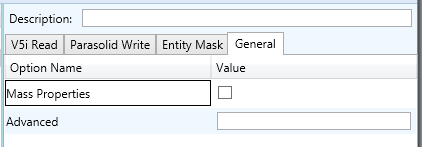
Each of these options is described below:
Option |
Description |
|---|---|
Mass Properties |
CATIA V5 mass properties (volume/area CofG) are read and any applied materials, using this option, in cases where a part has multiple solids, volume and area values are summed, but CofG data is invalid. Command Line Syntax:
|
Advanced |
Allows any of the Command Line Advanced arguments documented to be passed to the Unified Interface invocation. |
Common Options for Parasolid to CATIA V5i
Within the Configuration Manager pane of the Unified Interface, arguments that can be specified when publishing Parasolid into CATIA V5 data are grouped into the following areas:
Parasolid Read – Those arguments that affect how data is read from Parasolid
Catia5i Write – Those arguments that affect how the data is written to Catia V5
Entity Mask – Those arguments that allow specific read entities to be masked
General – Those arguments that are common to ALL Publishing activities regardless of source data
Parasolid Read Arguments
The image below shows the Parasolid Read arguments that are available, with their default settings:
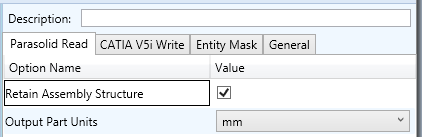
Each of these options is described below:
Option |
Description |
|---|---|
Retain Assembly Structure |
Retain Assembly Structure. Default is ON. Command Line Syntax to disable (remove structure):
|
Output Part Units |
Define the output part units (default mm) Command Line Syntax:
|
Catia5i Write Arguments
The image below shows the Catia5i Write arguments that are available, with their default settings:
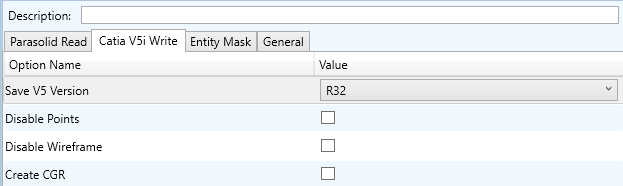
Each of these options is described below.
Option |
Description |
|---|---|
Write Catia5 Version |
Save a specified version of Catia V5 data Command Line Syntax
|
Disable Points |
Disable Point processing (default is On) Command Line Syntax to disable Points:
|
Disable Wireframe Processing |
Disable Wireframe processing (default is On) Command Line Syntax to disable Wireframe:
|
Create CGR |
Create a tessellated CGR file output (default is OFF) Command Line Syntax to create a CGR:
|
Parasolid to CATIA V5i Entity Mask Arguments
The image below shows the Parasolid to CATIA V5i Entity Mask arguments that are available, with their default settings:
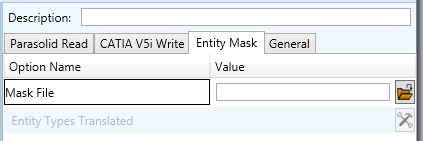
Each of these options is described below:
Option |
Description |
|---|---|
Output Geometry File Type |
Specifies the Mask File to be written to, that can be referenced by future translations. A Mask file MUST be specified if masking is required. The first line in this file is OFF ALL ENT: Command Line Syntax:
|
Write Face Colours |
Specifies a selection list from which to select which entity types are to be processed. The following types are available: “SOL” - Masks any 3D entity
“SKIN” - Masks any 2D entity
“CUR” - Masks any 1D entity
“POI” - Masks any 0D entity
“AXIS” - Masks Axis Systems
“ISOL” - Masks Isolated facetted solids
“CCRV” - If on creates a CCRV curve for wire frame edges that have more than one supporting curve
“TEXT” - Masks PMI Text
Command Line Syntax: Add any of the above to the specified mask file, one entry per line prefixed by the word ON, e.g.: ON POI to ensure they are considered in the translation. |
Parasolid to CATIA V5i General Arguments
The image below shows the General arguments that are available, with their default settings:
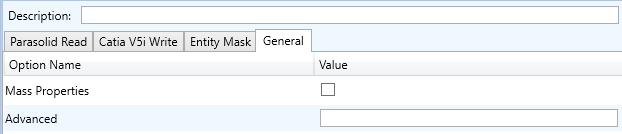
The option is described below:
Option |
Description |
|---|---|
Mass Properties |
CATIA V5 mass properties (volume/area CofG) are read and any applied materials, using this option, in cases where a part has multiple solids, volume and area values are summed, but CofG data is invalid. Command Line Syntax:
|
Advanced |
Allows any of the Command Line Advanced arguments documented below to be passed to the Unified Interface invocation |
Command Line Advanced Arguments
Advanced arguments can be added to the Command Line or the UI General->Advanced field.
CATIA V5i Advanced Arguments
Option |
Description |
|---|---|
Small Curves |
Report Small curves as errors. Default is OFF. Command Line Syntax to enable:
|
Extend Nurb Surfaces |
Extends NURBS surfaces beyond face limits for curve projection (default state) Command Line Syntax:
|
Remove Groups |
Remove Group entities into assembly structure. Default is OFF. Command Line Syntax to enable:
|
Use Ref Name |
Uses file name from input system to name files Default is OFF. Command Line Syntax to enable:
|
Simplify Curves |
Convert NURBS curves to conics. Default is OFF. Command Line Syntax to enable:
|
Convert Curves to NURBS |
Convert curves to NURBS. Default is ON. Command Line Syntax to disable:
|
Conversion Tolerance |
A secondary argument to ‘Convert Curves’ defining the conversion tolerance. Default is 0.00001 Command Line Syntax:
|
Convert Surfaces to NURBS |
Process data (read) types as NURBS. Data type is selected from options. Default is All. i.e. convert ALL surfaces to NURBS Command Line Syntax:
e.g. |
Conversion Tolerance |
A secondary option to ‘Convert Surfaces to NURBS’. Defines the conversion tolerance. Default is 0.00001. Command Line Syntax
|
Convert Torus to NURBS |
Even when data is read as NURBS data, the Torus types are converted to NURBS by default, this can be disabled using the command line. Default is ON. Command Line Syntax to disable:
|
Trim Face Surfaces |
Trims face surfaces. Default is ON. Command Line Syntax to disable:
|
Process Large Faces |
Enable reading of faces larger than 1km. Default is OFF. Command Line Syntax to enable:
|
UDF Axis Systems |
Enable reading of User Defined Axis systems. Default is OFF. Command Line Syntax to enable.
|
Graphical Read |
By default the BREP data will be read. It is possible to read the CATIA V5 data as a graphical representation using this option. Default is OFF. Command Line Syntax to enable:
|
Filter Geometry |
It is possible to filter large planes (construction planes) larger than a given size using (default being 1000 meters) Command Line Syntax:
There is a special case for PLANES (typically construction planes) which by default are not read, these can be enabled using Command Line Syntax:
|
Parasolid Tolerant Modelling |
Enable Parasolid Tolerant Modelling. Default is ON. Command Line Syntax to disable:
|
Sew Parasolid Bodies |
Enabled Sewing of Parasolid Bodies. Default is ON. Command Line Syntax to disable:
|
Incremental Sewing |
Enable incremental Sewing. Default is ON. Command Line Syntax to disable:
|
Incremental Sewing Iterations |
No. of iterations for incremental Sewing (default 5) Command Line Syntax:
|
Explode Solids to Faces |
Explode Solids to Individual Faces. Default is OFF. Command Line Syntax to enable:
|
Split Discontinuous Surfaces |
Split Discontinuous Surfaces. Default is ON. Command Line Syntax to disable:
|
Force Body Creation |
Force body creation (No check of Parasolid entities - Default is ON) Command Line Syntax to disable:
|
Fix Degenerate Edges |
On face create failure, check, and fix any degenerate edges. Default is ON. Command Line Syntax to disable:
|
Parasolid to CATIA V5i Advanced Arguments
Option |
Description |
|---|---|
Convert Surfaces to NURBS |
Read surfaces as NURBS surfaces (else read in native form). Default is ON. Command Line Syntax to disable:
|
Convert Edge Curves to NURBS |
Read edge curves as NURBS curves (else read in native format) (default ON) Command Line Syntax to disable
|
Mass Props Volume Tolerance |
Set tolerance for volume percentage comparison to consider as success (default 1.0) Command Line Syntax:
|
Mass Props Area Tolerance |
Set tolerance for area percentage comparison to consider as success (default 0.5) Command Line Syntax:
|
Mass Props CofG Tolerance |
Set tolerance for Centre Of Gravity (CofG) percentage comparison to consider as success (default 1.0) Command Line Syntax:
|

